Which baby tracker apps work for nannies and grandparents?
Cradle publishes this comparison. App details checked on October 30, 2026.
Most iPhone baby trackers let a nanny or grandparent log into the same record as the parents, but they do it in different ways. Nara Baby, Glow Baby and ParentLove send an invite by email or link. Huckleberry’s FAQ says caregivers sign in to the same account. Baby Tracker by Nighp Software uses a sync group with a shared email and password. Cradle gives the caregiver a one-time invite code or QR code that works once and expires after 15 minutes. Whether the caregiver pays, whether you can remove them later and whether the app runs on a grandparent’s Android phone vary just as much.
We publish Cradle. Everything below about other apps comes from their own App Store listings, websites and help pages on the date shown above. “Not stated” means we couldn’t find the detail there, not that the feature is missing.
How does a nanny or grandparent join each app?
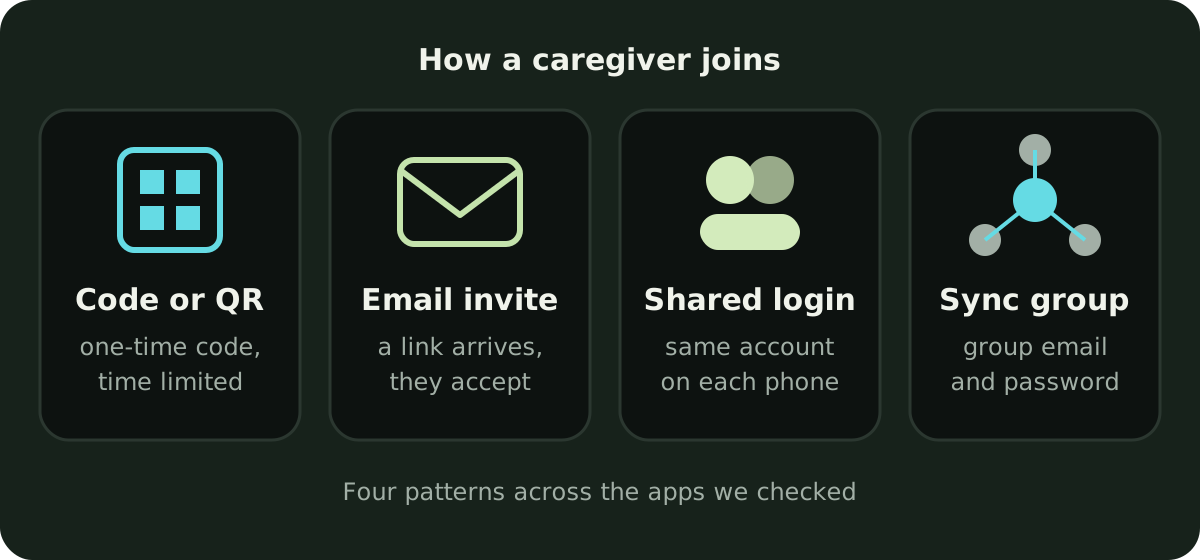
There are four patterns: an invite tied to a code or an email, a shared login on the parent’s account, a sync group that each device joins with the same credentials, and a plain “sync across devices” line that doesn’t say which.
Cradle: Baby Sleep Tracker by Zorest uses an invitation. The parent who added the baby opens the baby’s Settings, taps “Invite a caregiver”, chooses Partner or Caregiver, and sends the invite code or shows its QR code. The caregiver chooses the invite-code option in Cradle and enters or scans it. A code works once and expires after 15 minutes, so a parent creates a fresh one if it has been used or has lapsed. Invited members see and log care for that baby; only the owner edits the baby’s profile and invites others. Our guide to inviting a caregiver walks through it.
Nara Baby invites by email. Its FAQ says you send the invite from the Family tab, the person gets an email to create an account, and if they already have one the invitation appears at the top of their Family tab. Once added, “they have 100% full access in the app the same way that you do”. The account that created the family can remove other caregivers from the Family tab.
Glow Baby says you can invite your partner, loved ones and pediatrician “with just an email”. Adding a second caregiver needs a Glow Premium Family plan.
ParentLove says you send a private invite link, and that invites give “per-child, per-feature access”. Its App Store notes mention a Join Family option in the sign-in flow. Its pages don’t describe removing someone.
Huckleberry’s FAQ says caregivers “can sign in to the same account on each phone”, with updates syncing between devices. Neither page describes a separate invite step.
Baby Tracker by Nighp Software uses a sync group. Its FAQ says you create the group on the device that holds the data, then on other devices go to Settings, choose Sync Data between Devices, and enter the group’s email address and password. It says there’s no limit on devices in theory and that the company tested up to four. The FAQ describes leaving as Disconnect and says nothing about removing one caregiver.
Baby Daybook’s website says to sign in, then “add your partner or nanny to the caregivers list”. It doesn’t say how the invitation reaches them.
Napper says you can share your baby, and your subscription, with as many caregivers as needed. The join steps aren’t stated on its listing or website.
Baby Connect lists instant sync with “family, babysitters, nannies, or daycare” and says its subscription is “valid across all devices and family members/caregivers”. The join steps aren’t stated. Its website wouldn’t load for us, so this comes from the App Store listing only.
Baby Tracker & Newborn Log by Med ART Studios (formerly Sprout) describes family sharing that syncs across devices in real time. Neither the listing nor the website says how a caregiver joins.
How do the apps compare for a non-parent caregiver?
| App | How a caregiver joins | Needs their own paid plan? | Remove or limit a caregiver | Android | Quick logging the pages describe |
|---|---|---|---|---|---|
| Cradle | One-time invite code or QR code from the owner | No, the owner’s subscription covers them | Invited members log care but can’t edit the profile or invite others | No, iPhone and iPad only | Sleep timer; log sleep, feeds and diapers from Apple Watch |
| Huckleberry | Sign in to the same account | Sync is a free feature | Not stated | Yes, Google Play listed | One-touch tracker for sleep, diapers, feeds and pumping |
| Napper | Not stated | No, the subscription is shared with caregivers | Not stated | Yes, Google Play listed | Not described |
| Nara Baby | Email invite from the Family tab | No, “one payment covers your whole caregiver circle” | Creator can remove a caregiver; everyone has full access | FAQ mentions Android phones and Google Play billing | One-tap diaper rash; Siri; Live Activities |
| Glow Baby | Email invite | A Premium Family plan is needed to add a second caregiver | Not stated | Yes, iOS and Android | “Easy-to-use” logging; no detail |
| Baby Daybook | Added to a caregivers list | No, connected caregivers get Premium too | Not stated | Yes, Google Play listed | One-tap diapers and nursing; widgets; Siri Shortcuts |
| Baby Connect | Not stated | Subscription is valid across family members and caregivers | Not stated | Not stated on the listing; “all platforms, including web browsers” | Siri voice tracking; real-time tracker |
| ParentLove | Private invite link | No, unlimited caregiver sharing is free; Pro extras need ProFamily to share | Per-child, per-feature access | Yes, iOS and Android | “Tap, done”; one-tap left or right nursing |
| Baby Tracker (Nighp) | Join a sync group with its email and password | Core tracking is free; Group Plus shares one Plus plan with the group | Disconnect only; no per-caregiver removal described | Yes, syncs with Android devices in the group | Siri Shortcuts; Apple Watch; widgets |
| Med ART Studios (formerly Sprout) | Not stated | Not stated | Not stated | Yes, “Sprout Baby” on Google Play | Siri; Apple Watch; timer widgets |
Does the caregiver need to pay?
Usually not, though one app charges for the second seat and another doesn’t say.
- Cradle: the baby owner’s active subscription covers invited caregivers, and the pricing page says caregivers don’t need a separate subscription for that shared log. If the owner’s plan lapses, shared access can pause, and a caregiver’s own subscription can’t restore access to someone else’s baby.
- Nara Baby: “One payment covers your whole caregiver circle.” If nobody in the family subscribes after the 7-day trial, the app becomes read only for everyone in it.
- Napper: the subscription is shared with every caregiver you add.
- Baby Daybook: caregivers connected to your shared baby profiles get Premium features with “no separate purchase needed”.
- Baby Tracker by Nighp: core tracking is free. Group Plus unlocks Plus for everyone in a sync group from one subscription.
- Huckleberry: syncing with multiple caregivers is listed as a free feature. Paid tiers add SweetSpot and other extras.
- ParentLove: unlimited caregiver sharing is free. Sharing Pro features such as Milk Bank or vitals with every caregiver needs ProFamily.
- Glow Baby: the tracker is free, but adding a second caregiver needs the Premium Family plan.
- Baby Connect: the subscription covers all devices and family members or caregivers. Without one, access is read only after the 7-day trial.
- Med ART Studios (formerly Sprout): not stated.
What if a grandparent uses Android?
Then Cradle isn’t the right choice. Cradle runs on iPhone and iPad, with an Apple Watch companion, and there’s no Android app. A grandparent with an Android phone can’t join the shared log.
Huckleberry, Napper, Glow Baby, Baby Daybook, ParentLove and Med ART Studios’ app all link to Google Play from their own websites. Baby Tracker by Nighp has an Android version, and its FAQ says Android and iOS devices that join the same sync group share the data. Nara Baby’s FAQ mentions Android phones and Google Play billing, though we couldn’t find a plain availability line. Baby Connect’s App Store listing doesn’t mention Android but says the app runs on “all platforms, including web browsers”.
Before you commit, check that the feature the grandparent needs is on their platform. Huckleberry, for example, marks AI logging, widgets and Apple Watch support as iOS only on its free-features page.
What should a handover show?
Three things: the last sleep, the last feed, the last diaper. Whoever takes over needs to know when the baby woke, last ate and was last changed, because those answer the next hour’s questions. A good shared log shows them on the first screen.
Cradle shows how long the baby has been awake or asleep next to the last feed and last diaper change, on the phone or from Apple Watch, and puts every caregiver’s entries in one daily timeline. See shared baby tracking for what nursery members share. ParentLove makes a similar promise: “everyone knows when baby last ate or napped”. Nara Baby says caregivers can view the baby’s recent activities when they switch roles. Med ART Studios’ watch complication shows the time since the last feed, sleep and diaper change.
One habit helps in every app: log the latest care moment before you leave, so the next person inherits a complete record.
Which app fits which family?
- If a grandparent or nanny uses Android, pick Huckleberry, Napper, Glow Baby, Baby Daybook, ParentLove, Nighp’s Baby Tracker or Med ART Studios’ app. Cradle is iPhone and iPad only.
- If you want sharing without paying anything, Huckleberry and ParentLove both list caregiver sync as free, and Nighp’s core tracking is free.
- If you want to remove a caregiver later, Nara Baby is the only app whose pages describe that step.
- If you want the caregiver to have less than full access, ParentLove describes per-child, per-feature invites, and Cradle keeps profile edits and invitations with the owner while caregivers see and log care.
- If you want one payment to cover everyone, Cradle, Napper, Nara Baby, Baby Daybook, Baby Connect and Nighp’s Group Plus all describe that.
- If you want the shared log to sit beside nap windows for eligible babies aged two to under 25 months, that’s what Cradle does on iPhone. Our roundup of sleep apps with nap predictions and shared logs compares that combination across apps.
Sources
- Cradle shared baby tracking
- Cradle pricing
- Cradle baby sleep tracking and daily care
- Huckleberry: Baby Tracker (App Store)
- Huckleberry free features and FAQ (Huckleberry)
- Huckleberry (official website)
- Napper: Baby Sleep Tracker (App Store)
- Napper pricing
- Nara Baby & Pregnancy Tracker (App Store)
- Nara Baby & Pregnancy Tracker FAQs (Nara Organics)
- Glow Baby Tracker & Growth App (App Store)
- Glow Baby app (Glow)
- Baby Daybook - Newborn Tracker (App Store)
- Baby Daybook app
- Baby Daybook Premium
- Baby Connect: Newborn Tracker (App Store)
- ParentLove: Baby Tracker (App Store)
- ParentLove (official website)
- Baby Tracker - Newborn Log by Nighp Software (App Store)
- Baby Tracker FAQ (Nighp Software)
- Baby Tracker (Nighp Software)
- Baby Tracker & Newborn Log by Med ART Studios (App Store)
- Baby Tracker by Med ART Studios (official website)