Which baby trackers make it easy to review history before a pediatrician visit?
Cradle publishes this comparison. App details checked on November 9, 2026.
Most popular iPhone baby trackers let you look back at past days, but they differ a lot in how. When we checked each company’s own pages, Baby Daybook, Glow Baby, ParentLove and Baby Tracker by Nighp Software all describe a PDF you can produce from your logs, and ParentLove names a “Pediatrician Report” in particular. Nara Baby exports a CSV spreadsheet. Huckleberry, Baby Connect and Baby Tracker & Newborn Log by Med ART Studios describe reports, charts or trend views inside the app, and Med ART Studios adds a Doctor Visit Planner. Cradle has a daily timeline and trends for sleep, naps and awake time, and our pages don’t describe an export, so with Cradle you review the history on the phone itself.
We publish Cradle. Everything below about other apps comes from their own App Store listings, websites and help pages on the date shown above. “Not stated” means we couldn’t find the detail there, not that the feature is missing. Several of these features sit behind a paid tier, and we say so where the page does.
What does “reviewing history” mean in a baby tracker?
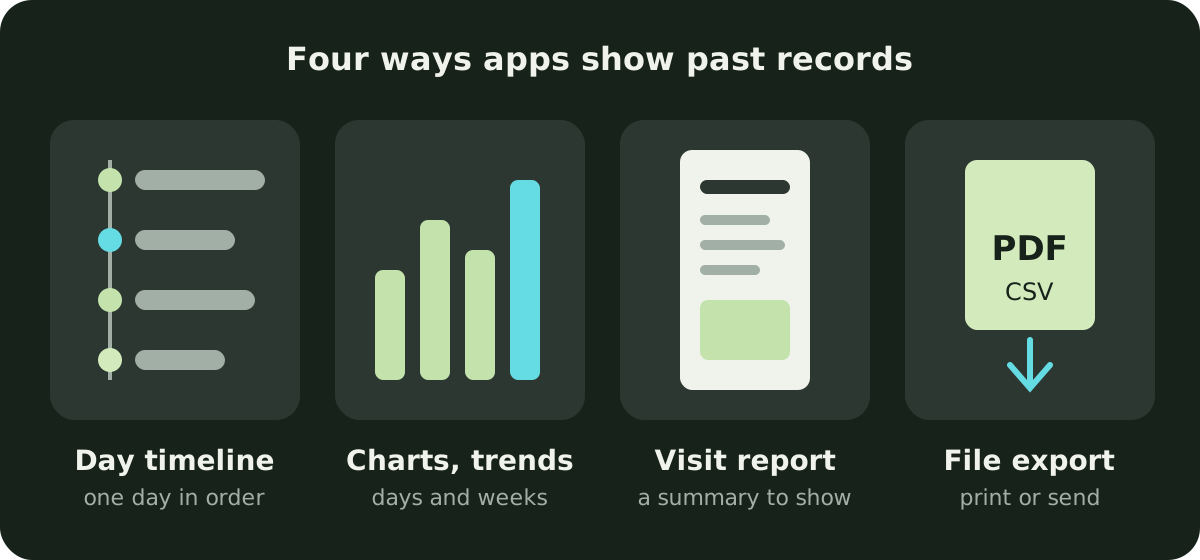
Apps tend to offer some mix of four things:
- A day view or timeline: every entry in order, one day at a time. Good for “what happened on Tuesday night?” and less good for “how has this changed over a month?”.
- Charts and trends: totals and averages across days or weeks, such as sleep per day or feeds per day.
- A report built for appointments: a summary page an app produces for you to show or send.
- A file export: a PDF to print or email, or a CSV spreadsheet you can open elsewhere.
Which one you need depends on the visit. If you just want to answer a question in the room, a clear chart on your phone may be enough. If you want to hand something over, look for a report or an export.
Which apps have reports, charts or exports?
| App | Day view or history | Charts and trends | Report for appointments | Export |
|---|---|---|---|---|
| Cradle | Daily timeline; revisit and edit previous days | Trends for sleep, naps and awake time | Not described | Not described |
| Huckleberry | “Sleep summaries, history, and averages” (free) | Enhanced Reports with sleep, feeding and growth trends (Plus and Premium) | Allergy report “to share with a pediatrician”; free solids report | Not stated on the pages we could load |
| Baby Daybook | Entire history (Premium) | Interactive charts by day, week or custom range (Premium) | Printable health and growth reports | PDF of the entire activity history (Premium) |
| Nara Baby | History tab | Graphs and comparisons by day or week; a 14-day trends view | Not stated | CSV, also without a subscription |
| Glow Baby | Baby Timeline | Charts and reports (Premium) | Weekly reports and summaries (Premium) | PDF and CSV (Premium) |
| Baby Connect | Not stated | Trends, charts, weekly averages; monthly Highlights | Highlights shared as an image | Not stated |
| ParentLove | Unlimited history (free) | Daily or weekly summaries (free); deeper Stats & Trends (paid) | One-tap Pediatrician PDF (paid) | CSV (paid) |
| Baby Tracker (Nighp) | Activity by day, week or month | Sleep, feeding and diaper patterns | Reports to email or print for healthcare professionals | PDF; free or paid not stated |
| Med ART Studios | Feeding, sleep and diaper history | Trend charts with totals | Doctor Visit Planner for symptoms, medications and temperatures | No PDF or CSV listed |
What do the details look like in each app?
Huckleberry’s App Store listing puts “Sleep summaries, history, and averages” in the free app, and a recent update note says the full solids report, with favorite foods and allergens, is now free for everyone. Enhanced Reports, which show growth, sleep and feeding trends, are part of the paid Plus and Premium tiers, and the pricing page says they need a baby aged 2 months or older. The listing says you can see growth trends and “share them easily with your pediatrician”, and another update note adds an allergy report to share with a pediatrician. Huckleberry’s help centre article about exporting data didn’t load for us on the drafting day, so we haven’t described an export. Huckleberry’s comparison with Cradle is on our Huckleberry alternatives page.
Baby Daybook’s Premium page is the most direct about appointments of any app here. It says Premium lets you export your baby’s entire activity history to an organised PDF, and asks whether you need to share a sleep log or feeding history with your pediatrician. Premium also unlocks charts of feeding, sleep and diapers by day, week or a custom date range, and unlimited access to the full history. The App Store listing mentions printable health and growth reports, and its update notes say growth charts are now free. We compared it with Cradle in Cradle and Baby Daybook compared.
Nara Baby’s listing describes automatic graphs with comparisons by day or week, and a History tab. Nara’s FAQ is candid about the limit: trends cover a 14-day view, and “within the app there’s no way to see trends further into the past”. For the long view, the FAQ says you can download a child’s data as a CSV file from the avatar next to the child’s name, and that you can still view and export existing data without a subscription. A spreadsheet is useful if you’re comfortable sorting it yourself; there’s no doctor-ready report described.
Glow Baby’s site says the free app is a fully functional tracker, and that Premium adds personalised charts and reports, weekly reports and summaries, and data export in PDF and CSV format. The same page says you can invite your partner, loved ones and pediatrician by email, but it doesn’t say whether a pediatrician invite needs a paid plan; adding caregivers needs the Premium Family Plan. See Cradle and Glow Baby compared.
Baby Connect’s listing advertises “Comprehensive reports: Trends, charts, and weekly averages”, plus monthly Highlights with growth charts and feeding, diaper and pumping trends that you can view by calendar month or by your baby’s age, and share as an image. Export isn’t mentioned on the listing. Baby Connect’s website didn’t load for us on the drafting day, so these facts come from the App Store listing only. Without a subscription the app is read-only after its 7-day trial. Our Cradle and Baby Connect comparison has more detail.
ParentLove’s website says every log stays in your history with no paywall, and the free app includes daily or weekly summaries. Its paid tiers add a one-tap Pediatrician PDF with customisable averages and optional notes for check-ups, and CSV export. Pro is a one-time upgrade rather than a subscription, and core logging and caregiver sharing are free. ParentLove runs on iPhone and Android. More in Cradle and ParentLove compared.
Baby Tracker by Nighp Software’s listing says you can review activity by day, week or month, export records as a PDF, and email or print reports for caregivers and healthcare professionals. It doesn’t say whether reports and export are free or part of Plus. The FAQ’s Data Clone feature is for copying data to another device, not for reports. See Cradle and Baby Tracker by Nighp compared.
The listing for Baby Tracker & Newborn Log by Med ART Studios, formerly Sprout, describes feeding history, sleep trends and diaper patterns over time, trend charts with totals, and WHO and CDC growth charts. A recent update added a Doctor Visit Planner that summarises recent symptoms, medications and temperature readings for an upcoming appointment. No PDF or CSV export of logs is listed; the only export mentioned is a keepsake book of memories. Our comparison with Cradle has more detail.
Cradle: Baby Sleep Tracker by Zorest is for iPhone and iPad, with an Apple Watch companion, and is free to download with a required subscription (see pricing). Our baby sleep tracking page says the daily timeline shows sleep, feeds, diapers and other care in order, that you can revisit previous days and edit records if you missed a moment, and that trends help you explore sleep, naps and awake time over time. Our pages don’t describe a PDF, CSV or report export, so if you want to hand your pediatrician a printout, Cradle isn’t the app for that today. You would open the timeline or trends on your phone during the visit.
Which app fits which family?
- If you want a file to print or email before a checkup, Baby Daybook (Premium), Glow Baby (Premium), ParentLove (paid) and Baby Tracker by Nighp all describe a PDF. ParentLove’s is the only one named for pediatricians.
- If you want your raw data in a spreadsheet, Nara Baby’s CSV export is described as available even without a subscription, and Glow Baby and ParentLove list CSV on paid tiers.
- If you mostly want trends to look at on your phone, Huckleberry, Baby Connect and Med ART Studios all describe charts, and Huckleberry’s free tier includes sleep summaries and averages.
- If the visit is about an illness, Med ART Studios’ Doctor Visit Planner gathers symptoms, medications and temperatures in one place.
- If what matters most is a shared record of sleep, feeds and diapers that every caregiver logs into, with nap windows for eligible babies aged two to under 25 months, Cradle is built for that. Its history lives in the app’s timeline and trends rather than an export.
What should I check before choosing?
- During the free trial, log a few days and then look for the report or export. Open the file and check that it covers the date range and the kinds of entries you need.
- Read which tier the feature sits in on the App Store listing for your country.
- If two of you log, check that the report includes entries from both phones.
- Ask your pediatrician’s office whether they’d rather see a printout, an emailed file or just your phone. Many visits only need you to answer a few questions.
Our guides to the best baby sleep tracker apps for iPhone and the best app for tracking baby diapers cover the logging side.
Whichever app you use, the records are your notes, not a diagnosis. If something about your baby’s feeding, sleep or diapers worries you, call your pediatrician rather than waiting for the next scheduled visit.
Sources
- Cradle baby sleep tracking and daily care
- Cradle pricing
- Huckleberry: Baby Tracker (App Store)
- Huckleberry pricing
- Baby Daybook - Newborn Tracker (App Store)
- Baby Daybook Premium
- Nara Baby & Pregnancy Tracker (App Store)
- Nara Baby app FAQs (Nara Organics)
- Glow Baby Tracker & Growth App (App Store)
- Glow Baby app (Glow)
- Baby Connect: Newborn Tracker (App Store)
- ParentLove: Baby Tracker (App Store)
- ParentLove baby tracker (Coquisoft)
- Baby Tracker - Newborn Log by Nighp Software (App Store)
- Baby Tracker FAQ (Nighp Software)
- Baby Tracker & Newborn Log by Med ART Studios (App Store)
- Sprout Baby Tracker (Med ART Studios)