Which baby tracker apps show the whole day as a timeline?
Cradle publishes this comparison. App details checked on November 9, 2026.
Several baby trackers describe a view of the whole day, but they mean different things by it. Cradle, Huckleberry, Glow Baby, Baby Connect and Baby Daybook describe a timeline or calendar-style view of logged activities. Baby Daybook’s sleep page also describes a sleep-only timeline. Med ART Studios shows the day’s sleep against its forecast. Nara Baby and Baby Tracker by Nighp Software describe a daily log or day list rather than a timeline. Napper and ParentLove don’t describe a whole-day view on the pages we checked. If you want feeds, diapers and sleep in time order on one screen, look for a view that covers every kind of entry, not sleep alone.
We publish Cradle. Everything below about other apps comes from their own websites, App Store listings and help pages on the date shown above. “Not stated” means we couldn’t find the detail there, not that the feature is missing.
What counts as a whole-day timeline?
A whole-day timeline puts every entry from one day in time order: the morning wake-up, each feed, each nap, each diaper, bedtime and night wakings. You can see what happened before a short nap, or how long it was between feeds, without adding things up in your head.
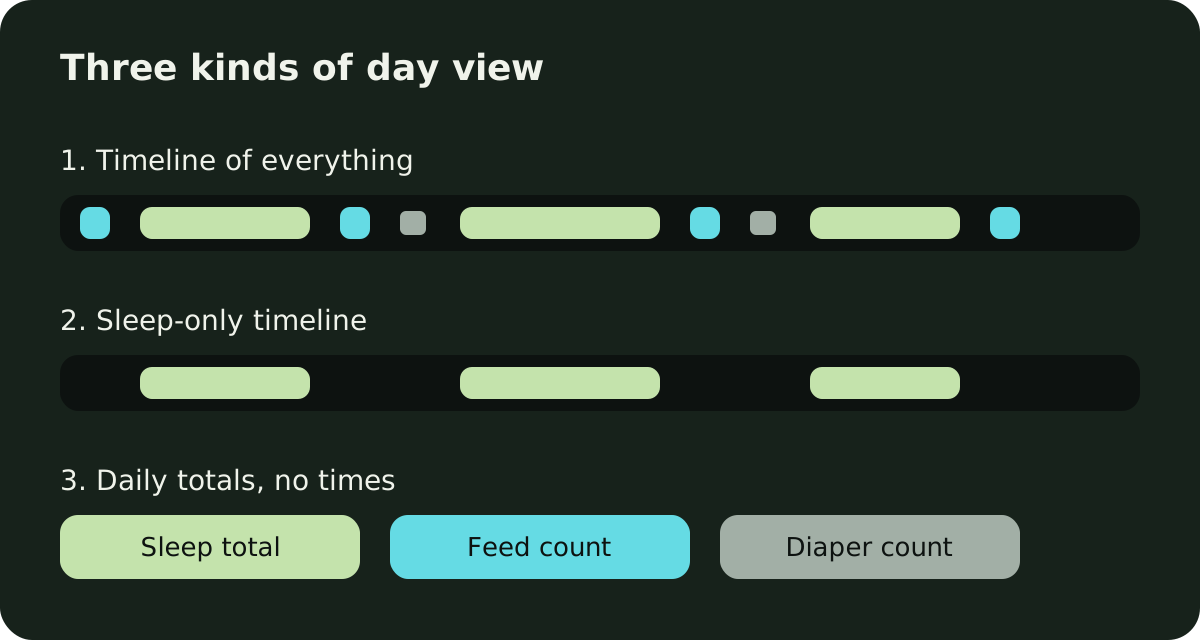
Apps use the word for three different things:
- A timeline of all activities. Sleep, feeds and diapers sit in one time-ordered view.
- A sleep-only timeline. Naps and night sleep are drawn across the day, but feeds and diapers live elsewhere.
- Daily totals or a list. You get hours slept, feed counts or a list of entries, without a picture of the day.
Which baby tracker apps show the day as a timeline?
| App (publisher) | Whole-day view described | Covers feeds and diapers too | Shared with other caregivers | Platforms listed |
|---|---|---|---|---|
| Cradle: Baby Sleep Tracker by Zorest (Zorest) | Daily timeline, events in order | Yes | Yes, by invitation | iPhone, iPad, Apple Watch |
| Huckleberry (Huckleberry Labs Inc.) | Day View: daily totals, then a calendar view of the day’s activities | Yes | Yes, sync across devices | iPhone, iPad, Apple Watch; Android |
| Baby Daybook (BALTAPIS UAB) | Timeline of daily patterns; “Visual Sleep Timeline” for sleep | Not stated for the timeline | Yes, family sync | iPhone, iPad, Apple Watch; Android |
| Glow Baby (Glow, Inc.) | Baby Timeline, all logged data in one place | Yes | Second caregiver needs the Family Plan | iPhone, iPad, Apple Watch; Android |
| Baby Connect (Seacloud Software LLC) | Timelines of every action; Timeline chart | Yes | Yes, family and caregivers | iPhone, iPad, Android, web browser, Apple Watch |
| Nara Baby (Nara Organics, Inc.) | Daily log; day’s routine for caregivers | Yes, in the log | Yes, invited members | iPhone, Apple Watch; Android |
| Baby Tracker (Nighp Software LLC) | Day tracker of recent records; review by day | Yes, in the list | Yes, sync group | iPhone, iPad, Apple Watch; Android |
| Baby Tracker & Newborn Log (Med ART Studios LLC) | Today’s Forecast: sleep across the day | No, sleep only | Yes, real time | iPhone, iPad, Apple Watch; Android |
| Napper (Napper AB) | Not stated | Not stated | Yes, as many caregivers as needed | iPhone, Apple Watch; Android |
| ParentLove (Coquisoft LLC) | Not stated; shared dashboard and daily summaries | Not stated | Yes, free and unlimited | iPhone; Android |
How does each app show the day?
Cradle: Baby Sleep Tracker by Zorest has a daily timeline that shows naps, feeds, diapers and night wakings in order, as they happened. Trends let you look at sleep, naps and awake time over a longer stretch. You can go back to previous days and edit entries you missed. Invited partners and caregivers log into the same record, so their entries show up on the same timeline, and the owner’s subscription covers them. Cradle runs on iPhone and iPad with an Apple Watch companion; it’s free to download and needs a subscription (see pricing). It doesn’t run on Android.
Huckleberry’s Day View announcement describes a toggle that gives a summary of the day’s totals for sleep, diapers and feeding, with a calendar view of all tracked activities for the day as you scroll down. Plus and Premium members can add a schedule made in Schedule Creator, which shows behind the tracked activities so you can compare the day with the plan. The announcement doesn’t say which plan Day View itself needs. The free plan lists tracking, reports and syncing across caregivers’ devices. More on our Huckleberry alternative page.
Baby Daybook’s website lists a Timeline that gives “a visual representation of your baby’s daily patterns” and says you can see each day’s activities side by side. The App Store listing calls it a “Visual Sleep Timeline”, a full-day sleep schedule at a glance, and the sleep tracker page describes it as a view of each sleep session’s start and end times. Neither says whether feeds and diapers appear on it, or whether it’s free or Premium. See Cradle and Baby Daybook compared.
Glow’s App Store release notes introduce a Baby Timeline that lets you view all of your baby’s logged data in one place. The website talks about colour-coded charts and summaries rather than the timeline. Tracking with a second caregiver needs the Premium Family Plan. See Cradle and Glow Baby compared.
Baby Connect’s reports page promises “timelines of every action” alongside charts, and the App Store release notes mention a Timeline chart. The sleep page adds a display of the previous day’s sleep. Baby Connect is the only app here that lists access from a web browser, which matters if a daycare or nanny logs from a computer. After a 7-day trial, a subscription is needed to save new entries. See Cradle and Baby Connect compared.
Nara Baby’s FAQ describes a daily log where you can review the day in an easy-to-read list, and the App Store listing says caregivers can quickly see the day’s routine when they swap over. Sleep graphs compare by day or week. It’s a list of entries rather than a drawn timeline. After the 7-day trial you can view and export your data but can’t add new entries until you subscribe.
For Baby Tracker by Nighp Software, the FAQ describes a day tracker that shows recent records, up to two weeks old, and the App Store listing says you can review activity by day, week or month. Core tracking is free. See Cradle and Baby Tracker by Nighp compared.
Baby Tracker & Newborn Log by Med ART Studios (formerly Sprout) has a website that describes Today’s Forecast, which starts each morning and updates as the day goes on, with a screen comparing actual, predicted and typical sleep times through the day. That covers sleep only. Its pages don’t describe a timeline of feeds and diapers. Sleep Forecast is iOS only for now. See Cradle and Baby Tracker by Med ART Studios compared.
Napper’s pages describe a personalised sleep schedule, trends and charts, but not a whole-day timeline. In a reply on its App Store listing, Napper says the app “switches to day mode” after you log the morning wake-up. See our Napper alternative page.
ParentLove describes a real-time shared dashboard where sitters see the last feed, nap and diaper, plus daily or weekly summaries per activity. It doesn’t describe a timeline of the whole day. Sharing with caregivers is free and unlimited. See Cradle and ParentLove compared.
Which app fits which family?
- If someone in the house uses Android, Huckleberry, Baby Daybook, Glow Baby, Baby Connect and Baby Tracker by Nighp all list Android and describe some kind of day view. Cradle is iPhone and iPad only, so one of those will suit a mixed household better.
- If a daycare or nanny needs to log from a computer, Baby Connect is the only app here that lists a web browser.
- If you want to compare the day against a planned schedule, Huckleberry’s Day View can show a Schedule Creator schedule behind your entries for Plus and Premium members.
- If you mostly care about sleep, a sleep timeline like Baby Daybook’s or Med ART Studios’ forecast view may be all you need.
- If you want feeds, diapers, naps and night wakings in one timeline on iPhone and iPad, shared with invited caregivers under one subscription, that’s what Cradle is built for. Our guide to starting sleep tracking in Cradle shows how the timeline fills up.
What should I check before choosing?
- Whether the timeline includes every kind of entry, or only sleep. The table shows where a page doesn’t say.
- Whether the view is in the free tier. Huckleberry and Baby Daybook don’t say which plan their day views need; Nara Baby and Baby Connect stop new entries after their trials.
- Whether you can fix the day. A timeline is only as good as its entries, so check you can add a missed nap afterwards and edit a timer someone forgot to stop.
- Whether everyone sees the same day. If two people log, both sets of entries need to land in one record.
A timeline shows what happened. It doesn’t tell you how much your baby should sleep or eat, and an app can’t replace your pediatrician. If something in the pattern worries you, bring the log to your next visit and ask.
Sources
- Cradle baby sleep tracking and daily timeline
- Cradle shared baby tracking
- Cradle pricing
- Huckleberry App: Day View (Huckleberry)
- Huckleberry app features and pricing
- Huckleberry: Baby Tracker (App Store)
- Baby Daybook app
- Baby Daybook sleep tracker
- Baby Daybook - Newborn Tracker (App Store)
- Glow Baby Tracker & Growth App (App Store)
- Glow Baby app (Glow)
- Baby Connect reports
- Baby Connect sleep tracking
- Baby Connect: Newborn Tracker (App Store)
- Nara Baby app FAQs (Nara Organics)
- Nara Baby & Pregnancy Tracker (App Store)
- Baby Tracker FAQ (Nighp Software)
- Baby Tracker - Newborn Log by Nighp Software (App Store)
- Sprout Baby Tracker (Med ART Studios)
- Baby Tracker & Newborn Log by Med ART Studios (App Store)
- Napper baby sleep app
- Napper: Baby Sleep Tracker (App Store)
- ParentLove baby tracker
- ParentLove: Baby Tracker (App Store)