How do I invite a partner or caregiver to my baby's nursery in Cradle?
To invite someone to your baby’s nursery in Cradle, open your baby’s Settings, tap Invite a caregiver, choose Partner or Caregiver, and share the invite code or let them scan its QR code. The other person opens Cradle, chooses the invite-code option and enters or scans the code. From then on, you both see and log care in the same record.
Only the parent who added the baby can send invitations, and each code works once for 15 minutes.
Who can invite a caregiver?
The parent who added the baby to Cradle is the only one who can invite others or edit the baby’s profile. The baby needs a saved profile first. Each invitation is for that one baby’s log, so if you care for two children, invite people to each baby separately.
Invited people can see the baby’s records and log care themselves. They can’t change the baby’s profile or invite anyone else.
How do I send an invitation?
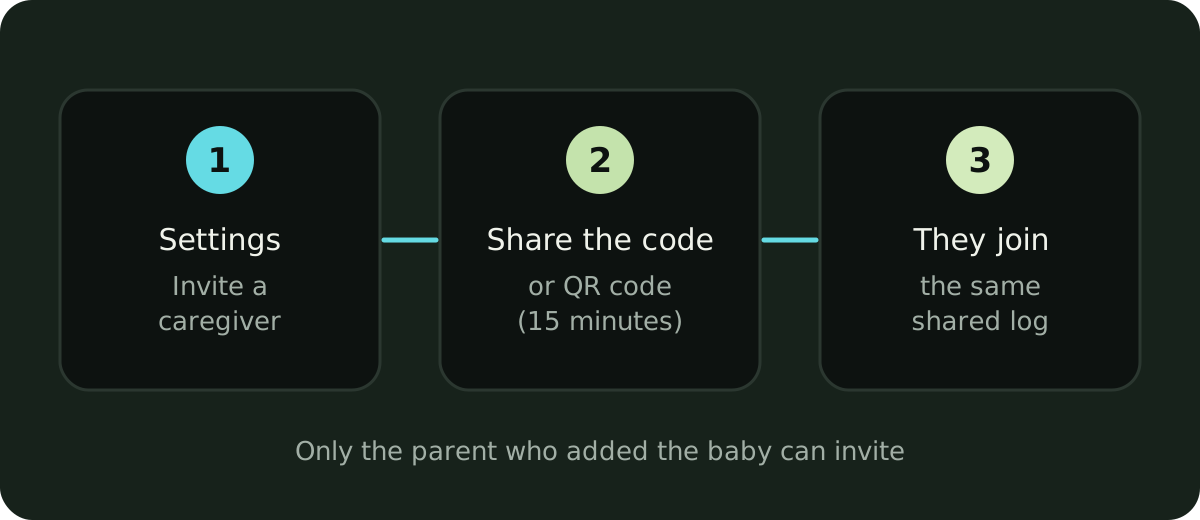
- Select your baby, open Settings and tap Invite a caregiver.
- Choose Partner or Caregiver.
- Send the invite code, or have the other person scan its QR code from your screen.
- On their phone, they choose the invite-code option in Cradle and enter or scan the code.
Send the code only to the person you mean to invite.
Why isn’t the invite code working?
An invite code works once and expires after 15 minutes. If joining fails:
- Check the code for typing mistakes.
- If it has been used or more than 15 minutes have passed, ask the parent who added the baby to create a new one.
- If Cradle can’t be reached, check the phone’s connection and try again.
Does the caregiver need their own subscription?
No. The active subscription of the parent who added the baby covers invited caregivers using that baby’s shared log. If that subscription stops being active, shared access can pause, and a caregiver’s own subscription won’t restore access to someone else’s baby. See pricing and caregiver access for the details.
What can we track together?
Everyone in the nursery shares sleep and daily care records, including feeds and diapers. Cradle also covers pumping, solids, medicine, temperature, mood and notes, so more of the day lives in one place.
A good habit at handover: look at the latest sleep, feed and diaper entries before you take over, then log what happens on your shift. The shared baby tracking guide has more on making handovers easy to follow.
Can I choose which updates I get?
Yes. Each person can choose whether to get sleep updates when another caregiver logs sleep, and can set one-off or daily care reminders. A grandparent’s nap log can reach you at work, and you can turn sleep updates off when you’d rather not be interrupted.
What should a new caregiver do first?
Once someone joins, a few small habits keep the record useful for everyone:
- Check you’re on the right baby. Each baby has a separate profile. Switch to the baby you’re caring for before reviewing their timeline or adding an entry, so one child’s naps and feeds stay with the right record.
- Read the latest entries. Look at the last sleep, feed and diaper before taking over.
- Log as you go. A nap, bottle or diaper change logged straight away gives the next person the same picture you had.
- Set up updates. Decide whether you want sleep updates when others log sleep, and add any reminders you need.
What about Apple Watch?
Anyone in the nursery who uses the Apple Watch companion can log sleep, nursing, bottles and diapers from their wrist, and those entries land in the same shared timeline. If you care for more than one baby, choose the right baby before logging. The baby sleep tracking guide covers Apple Watch setup.
Sources
This article is for general education and is not medical advice. Talk to your pediatrician about your baby's health.