What is the best baby tracker app for twins?
Cradle publishes this comparison. App details checked on October 30, 2026.
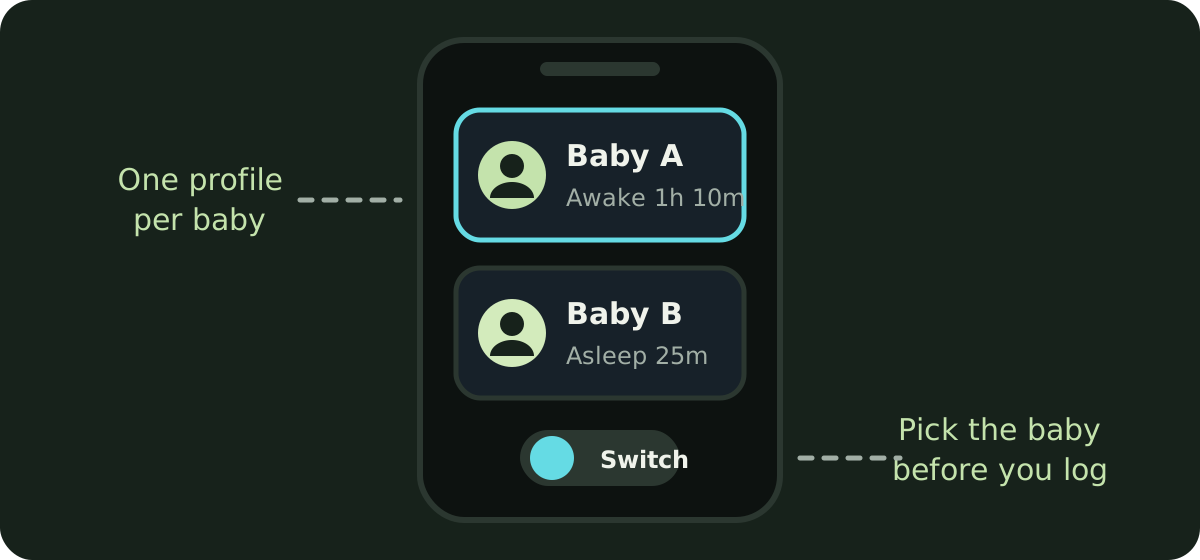
The best baby tracker for twins is one that keeps a separate profile for each baby, doesn’t charge for the second one, lets you switch between the two in a tap, and lets both parents log for both babies. When we checked each company’s own pages, Huckleberry, Nara Baby, Baby Daybook, ParentLove, Baby Tracker by Nighp Software, Glow Baby and Baby Tracker & Newborn Log by Med ART Studios (formerly Sprout) all describe multiple child profiles, and none of them lists a per-child charge. Baby Connect sets a limit by plan: up to 5 children on Family and up to 15 on Professional. Cradle keeps a separate profile for each baby and asks you to choose the baby you’re caring for before logging, on the phone and on Apple Watch. Napper’s listing doesn’t mention more than one baby.
We publish Cradle. Everything below about other apps comes from their own App Store listings, websites and help pages on the date shown above. “Not stated” means we couldn’t find the detail there, not that the feature is missing.
What makes tracking twins hard?
With one baby, the question at 3 am is “when did she last eat?”. With twins it’s “which one?”. Two logs run at once, and the entries land in whichever profile is open when you tap. Tandem feeds need two entries at the same time. Handovers double: a partner coming on shift needs the last feed and the last diaper for both babies, not one. And when the babies are on different rhythms, you want to see each timeline on its own, without the other baby’s naps mixed in.
Does the app keep the records apart? How many taps does it take to switch? Does a second profile cost more? Can your partner, and anyone else who helps, log for both babies from their own phone?
Which apps support more than one baby profile?
| App | More than one profile | Extra cost for a second baby | Switching between babies | Both parents log for both | Apple Watch baby selection |
|---|---|---|---|---|---|
| Cradle | Yes, a separate profile per baby; no limit stated | No per-baby pricing stated; one subscription, and the owner’s plan covers invited caregivers | Switch to the baby you’re caring for before logging | Yes, if invited to each baby’s log | Choose the correct baby before logging |
| Huckleberry | Yes, “multiple child profiles” | Multiple children are listed in the free app | “Switch between them effortlessly” | Caregivers sign in to the same account | Not stated; Apple Watch is a Plus feature |
| Nara Baby | Yes, “multiple children or twins” | Unlimited across children on both plans | Switch between children; new profiles added in account settings | Yes, caregivers get full access; one subscription covers the family | Not stated |
| Baby Daybook | Yes, “twins & siblings” | Not stated | Not described | Family sync is a Premium feature; connected caregivers get Premium access | Not stated |
| Baby Connect | Up to 5 on Family, up to 15 on Professional | Included in the plan limit | Not stated | Subscription valid across all devices and caregivers | Not stated |
| ParentLove | Yes, “each profile stays separate” | Not stated | “Switch babies with one tap” | Yes, with per-child, per-feature access; sharing is free | No Apple Watch app listed |
| Baby Tracker (Nighp) | Yes, “Add Another Baby” | Not stated | A baby switch page: tap the photo or name | Devices join a sync group | Not stated; watch features need the paid version |
| Med ART Studios (formerly Sprout) | Yes, “multiple infant and baby profiles” | Not stated | Not stated | “Share tracking with family and caregivers in real time” | Not stated |
| Glow Baby | Yes, “an unlimited number of children” | Not stated | Not stated | A partner is added to each baby profile separately; a second caregiver needs the Premium Family Plan | Not stated |
| Napper | Not stated | Not stated | Not stated | Share the baby and subscription with as many caregivers as needed | Not stated |
What do the details look like in each app?
Huckleberry’s tracking page says you can add multiple child profiles and switch between them, and its App Store listing counts individual profiles for multiple children among the free features. Its pricing page says caregivers sign in to the same account on each phone and updates sync between devices. Apple Watch support, lock screen updates and widgets are part of the paid Plus tier, and the pages don’t say how you pick a baby on the watch.
Nara Baby’s listing says it tracks and compares multiple children or twins, and that new profiles can be added at any time in account settings. Nara’s FAQ says tracking is unlimited across children on both the monthly and lifetime plans, caregivers invited from the Family tab get the same full access you have, and one subscription covers the whole family group. It also says you can switch between children. Apple Watch is listed on both plans without detail.
Baby Daybook’s listing says “Track twins & siblings seamlessly”, and its website says you can care for as many babies as you need. Switching isn’t described. Family sync, which lets a partner or nanny log in real time, is part of Premium, and the Premium page says caregivers connected to a shared baby profile get Premium access without buying it themselves.
Baby Connect is the one app here with a stated child limit: up to 5 children on the Family plan and up to 15 on the Professional plan. The subscription is valid across all devices and family members. Without a subscription the app is read-only after the 7-day trial. We couldn’t load its website on the drafting day.
ParentLove’s website says you can switch babies with one tap and each profile stays separate, and that invite links give per-child, per-feature access. Caregiver sharing is free and unlimited, and Pro is a one-time purchase. ParentLove is iPhone and Android, with no iPad or Apple Watch app.
Baby Tracker by Nighp Software’s FAQ explains that you add a baby from the baby profile photo with Add Another Baby, and switch on a baby switch page by tapping the photo or name. Caregivers’ devices join a sync group; Nighp says there’s no limit in theory and that it has tested up to four devices. Twins aren’t mentioned. The FAQ says Apple Watch features come with the paid full version.
Baby Tracker & Newborn Log by Med ART Studios, the listing formerly called Sprout, says you can manage multiple infant and baby profiles with each child’s routines tracked separately, and share tracking with family in real time. You can log feeds, sleep and diapers from Apple Watch, but the listing doesn’t say how you choose a baby there.
Glow Baby’s FAQ says you can track an unlimited number of children. Its help centre says a partner is added to a baby profile, so with twins you add them to each profile separately, and that adding a second caregiver needs the Premium Family Plan.
Napper’s listing says you can share your baby and subscription with as many caregivers as needed, but it doesn’t mention tracking more than one baby. If you’re drawn to Napper for its sleep schedule, ask its support team about twins before you subscribe.
Cradle keeps a separate profile for each baby. Our shared tracking page says to switch to the baby you’re caring for before reviewing their timeline or adding an entry, so one twin’s naps and feeds stay with the right record. On Apple Watch you choose the correct baby before logging when you track more than one. Each invitation is for one baby’s log, so with twins you invite your partner to each baby, and invited members can then see and log care for that baby. Our pages don’t state a limit on the number of babies or any per-baby pricing; Cradle has a single subscription, and the owner’s active subscription covers invited caregivers. See shared baby tracking and the pricing page.
Which app fits which family?
- If you want twin profiles without paying, Huckleberry lists multiple children in its free app, and ParentLove and Baby Tracker by Nighp keep core logging free.
- If you want one subscription that clearly covers both babies and every caregiver, Nara Baby’s FAQ says that in so many words, and Baby Connect’s Family plan covers up to 5 children.
- If one parent is Android and the other iPhone, Huckleberry, Baby Daybook, ParentLove and Glow Baby list both platforms. Cradle is iPhone and iPad only.
- If you want to see the last feed and last diaper for each twin on your wrist, Med ART Studios’ app and Cradle both describe Apple Watch logging, and Cradle’s pages describe choosing the baby on the watch first.
- If you want each twin’s sleep, feeds and diapers in a shared record, with nap windows for eligible babies aged two to under 25 months, that’s what Cradle is built for. Our guides to inviting a caregiver and to the best baby sleep tracker apps for iPhone cover the rest.
What should I check before choosing?
- Create two profiles during the trial and log a tandem feed. See how many taps it takes to record it for both babies, and whether the entries land in the right profiles.
- Invite your partner, then check they can see and log for both babies from their phone, not just one.
- Read the in-app purchases on the App Store listing for your country, and look for any wording about child limits.
- If you use a watch, check how it picks the baby before you rely on it at 3 am.
However you track, the records are for your own reference and for handovers. If you’re worried about either baby’s feeding or sleep, talk to your pediatrician.
Sources
- Cradle shared baby tracking
- Cradle baby sleep tracking and daily care
- Cradle pricing
- Huckleberry: Baby Tracker (App Store)
- Huckleberry tracking
- Huckleberry pricing
- Nara Baby & Pregnancy Tracker (App Store)
- Nara Baby & Pregnancy Tracker FAQs (Nara Organics)
- Baby Daybook - Newborn Tracker (App Store)
- Baby Daybook app
- Baby Daybook Premium
- Baby Connect: Newborn Tracker (App Store)
- ParentLove: Baby Tracker (App Store)
- ParentLove baby tracker (Coquisoft)
- Baby Tracker - Newborn Log by Nighp Software (App Store)
- Baby Tracker FAQ (Nighp Software)
- Baby Tracker & Newborn Log by Med ART Studios (App Store)
- Glow Baby Tracker & Growth App (App Store)
- Glow Baby app (Glow)
- How do I add my partner to Glow Baby? (Glow help centre)
- Do I have to have a premium subscription to add a caregiver? (Glow help centre)
- Napper: Baby Sleep Tracker (App Store)