How does Cradle compare with Baby Daybook?
Cradle publishes this comparison. App details checked on October 30, 2026.
Baby Daybook suits families who want a free, wide-ranging tracker that runs on iPhone, iPad, Apple Watch and Android, covers growth, teething and health alongside daily care, and who will pay for Premium if they want its sleep predictions or Family sync. Cradle suits iPhone and iPad families who want sleep, feeds and diapers in one shared timeline for every caregiver from the start, with a next-nap window for eligible babies, and who are fine with a required subscription.
We publish Cradle. Everything below about Baby Daybook comes from its App Store and Google Play listings, its website (including the short FAQ on its Premium page) and its terms of service on the date shown above. Baby Daybook has no separate help centre that we could find. “Not stated” means we couldn’t find the detail on those pages.
How do Cradle and Baby Daybook compare?
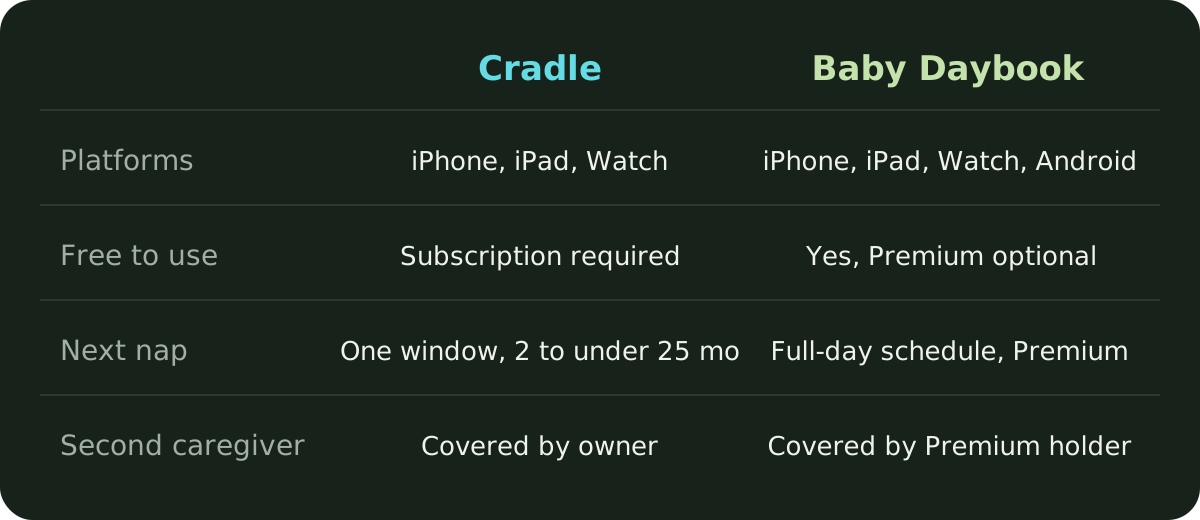
| Cradle | Baby Daybook | |
|---|---|---|
| Publisher | Zorest | BALTAPIS UAB (Lithuania) |
| Platforms | iPhone and iPad, with an Apple Watch companion | iPhone, iPad, Apple Watch and Android with Wear OS; the App Store also lists Mac (designed for iPad) and Apple Vision |
| Free to use | Free to download; a subscription is required to use the app | Yes; free with ads on Android, with an optional Premium plan |
| Tracks | Sleep, night wakings, breastfeeding, bottles, pumping, solids, diapers, medicine, temperature, mood and notes | Sleep, breastfeeding, pumping, bottles, solids, diapers, potty training, growth, teething, a health log, custom activities, photos and milestones |
| Next nap suggestion | A next nap window for eligible babies aged two to under 25 months | A full-day sleep schedule with predicted naps and bedtime; listed as a Premium feature; no age range stated |
| Second caregiver | Invited caregivers are covered by the subscription of the parent who added the baby | Family sync is a Premium feature; connected caregivers get Premium without buying it |
| Apple Watch | Start or end sleep, record nursing, add a bottle, log a diaper | Start and stop activities, add amounts, see reminders; start, pause, resume or stop sleep |
| Growth, teething and health | Not covered on our feature pages | Growth charts against WHO and CDC curves, a teeth chart, and a log for symptoms, medications, visits and vaccines |
| Price | See Cradle pricing | See below; the two store listings show a range of amounts |
How do their nap forecasts differ?
Baby Daybook calls its feature Sleep Predictions. Its Google Play listing describes “a real-time, personalized sleep schedule that adapts as you log naps and wake times”, shown on a visual sleep timeline, with reminders before your baby gets overtired. The website’s sleep predictions page says the schedule covers predicted naps, bedtime and awake windows for the whole day, that a “Current Prediction” shows the next nap time and a predicted wake-up, and that the app adjusts the rest of the day if a nap is skipped or your baby wakes early. It says the predictions use your baby’s logged sleep and awake times, the number of naps you select, and their age and developmental stage. The page says they suit newborns, infants and toddlers but gives no specific age range, and it doesn’t say how many days of history the feature needs. The Premium page lists Sleep predictions as a Premium feature.
Cradle suggests one window: the next nap after the current wake-up, rather than a full-day schedule. It’s for eligible babies aged two to under 25 months, and it looks at the previous 14 completed days of logged sleep, comparing similar naps (first naps with other first naps, for example) and the awake time before them. From four months, suitable history also helps estimate nap length. With too little history it gives a less personalized suggestion, and with no usable records it gives none rather than falling back on a generic age chart. Some suggestions show an estimated reliability score, which describes the history behind the suggestion and isn’t a measure of accuracy. Under two months, Cradle only observes sleep. The nap predictions page explains the method and its limits.
Neither app’s suggestion tells you when your baby will fall asleep. Baby Daybook’s own page describes its predictions as guidance and asks you to trust your own judgment, and Cradle’s window is the same kind of thing: a time to start watching for sleepy cues.
How does caregiver sharing work in each app?
Baby Daybook calls this Family sync. Its website says you sign in, then add a partner or nanny to a caregivers list so everyone can log data, and that data syncs between family members and other caregivers in real time. Family sync sits in Premium. The Premium page’s FAQ says caregivers connected to your shared baby profiles also get access to all Premium features, with no separate purchase needed. The same FAQ says one subscription works on both Android and iOS when you sign in with the same account, so a household with one iPhone and one Android phone can share a log.
In Cradle, the parent who added the baby invites a partner or caregiver from the baby’s Settings with a one-time code or QR code. Codes work once and expire after 15 minutes. That parent’s active subscription covers everyone using the shared log, so caregivers don’t need their own. Only the parent who added the baby can invite others or edit the profile, and each baby has a separate profile. Each person can choose whether to get sleep updates when someone else logs sleep. See how shared tracking works or our step-by-step guide to inviting a caregiver.
So in Baby Daybook, one person buys Premium and sharing unlocks for the people they connect. In Cradle, sharing is part of the subscription the owner already has. In both, the second caregiver pays nothing.
What does each app cost?
Cradle is free to download, and using it requires a subscription. Current prices are on the pricing page.
Baby Daybook is free to download and use. Its Google Play listing says it contains ads, and a reply from the developer on that listing says ads can be removed by upgrading to Premium. The Premium page lists seven Premium features: Family sync, Sleep predictions, Statistics, Timeline, Growth, Reminders and Data export to PDF. It doesn’t say what the free version includes. The App Store’s “What’s New” notes for version 7.4.1 say growth charts are now free, so the Growth line on the Premium page may be out of date.
The website shows no prices. The two store listings do, with several entries rather than one plan:
- The App Store in-app purchase list shows several entries: Premium Monthly at $1.99, $2.99, $3.99, $4.99, $5.99 and $9.99; Premium Yearly at $9.99 and $59.99; and Premium Lifetime at $99.99 and $59.99 (labelled “-40%”). A “Premium Yearly” entry is marked with a free trial; the trial length is not stated.
- The Google Play listing shows in-app purchases from $1.99 to $99.99 per item.
Baby Daybook’s terms of service say a one-time free trial may be offered, limited to one per Apple ID or Google account, and that subscriptions renew automatically unless cancelled at least 24 hours before the billing period ends. Check the price shown in the app for your country before you subscribe.
What does Baby Daybook include that Cradle doesn’t?
Baby Daybook goes well beyond daily care. Its listings describe a growth tracker with height, weight and head circumference plotted against CDC and WHO charts (and, since the latest update, Fenton charts for preterm babies), a teething chart, and a health log for symptoms, temperature, medications, doctor visits and vaccines. It logs potty training, custom activities such as tummy time, walks and baths, and keeps a photo album with milestones. Breastfeeding has start and stop timers for each side, pumping records the amount expressed, and solids can carry notes on ingredients, allergens and reactions. It exports history and reports to PDF, supports Siri Shortcuts, and offers Home Screen and Lock Screen widgets.
It runs on Android as well as iPhone and iPad, with Wear OS support alongside the Apple Watch app, and one Premium subscription works across both platforms. Its Apple Watch app lets you start and stop activities, select activity groups, add amounts and see reminders, and its Live Activities let you start, pause, resume or stop a running activity from the Lock Screen or Dynamic Island, including switching sides mid-feed.
The App Store listing says it supports 40 languages.
What does Cradle focus on?
Cradle is narrower. It keeps sleep, feeds, diapers, pumping and night wakings in one daily timeline, with trends for sleep, naps and awake time, and it shows how long your baby has been awake or asleep next to the last feed and last diaper. Every invited caregiver sees and logs into the same record. The Apple Watch companion handles quick sleep, nursing, bottle and diaper logging from the wrist, and Live Activities follow a running nap on the iPhone Lock Screen. You can set one-off or daily care reminders. See baby sleep tracking in Cradle.
It doesn’t have growth charts, a teething tracker, a health log, a photo album, PDF export or an Android app, and it isn’t free to use.
Which one is best for my family?
- Baby Daybook fits if you want a free tracker, if anyone in the family uses Android, or if growth charts, teething, vaccines and a health log matter to you. Budget for Premium if you want sleep predictions or Family sync; one subscription covers the caregivers you connect.
- Cradle fits if your family uses iPhone or iPad, you want every caregiver in one shared log under a single subscription from the first day, and you’d like a next-nap window for an eligible baby built from your own logs rather than a full-day schedule.
- Either works for everyday logging of sleep, feeds, pumping and diapers. Try a full day with both caregivers logging during any free trial, and see which record you’d rather read at 3 am.
For more options, see our roundup of baby sleep apps that combine nap predictions and shared logs, or our comparison of Cradle and Glow Baby.
Sources
- Baby Daybook - Newborn Tracker (App Store)
- Baby Daybook - Newborn Tracker (Google Play)
- Baby Daybook app (Baby Daybook)
- Baby Daybook Premium (Baby Daybook)
- Sleep predictions (Baby Daybook)
- Sleep tracker (Baby Daybook)
- Feeding tracker (Baby Daybook)
- Apple widgets and Watch app (Baby Daybook)
- Terms of service (Baby Daybook)
- Cradle nap predictions
- Cradle shared baby tracking
- Cradle baby sleep tracking
- Cradle pricing