How does Cradle compare with Baby Tracker by Nighp Software?
Cradle publishes this comparison. App details checked on October 30, 2026.
Baby Tracker by Nighp Software suits families who want a free, broad baby log that also covers growth, health and milestones, who may have an Android phone in the house, and who are happy to pay for Plus if they want its What’s Next cues or an ad-free app. Cradle suits iPhone and iPad families who want sleep, feeds and diapers in one shared timeline for every caregiver from the start, with a next nap window for eligible babies, and who are fine with a required subscription.
This post is about “Baby Tracker - Newborn Log” by Nighp Software LLC, the one on the App Store at id779656557. Several apps are called Baby Tracker. “Baby Tracker & Newborn Log by Med ART Studios (formerly Sprout)” is a different app from a different company, and it isn’t covered here.
We publish Cradle. Everything below about Baby Tracker comes from Nighp Software’s App Store and Google Play listings, its website and its FAQ pages on the date shown above. “Not stated” means we couldn’t find the detail there.
How do Cradle and Baby Tracker compare?
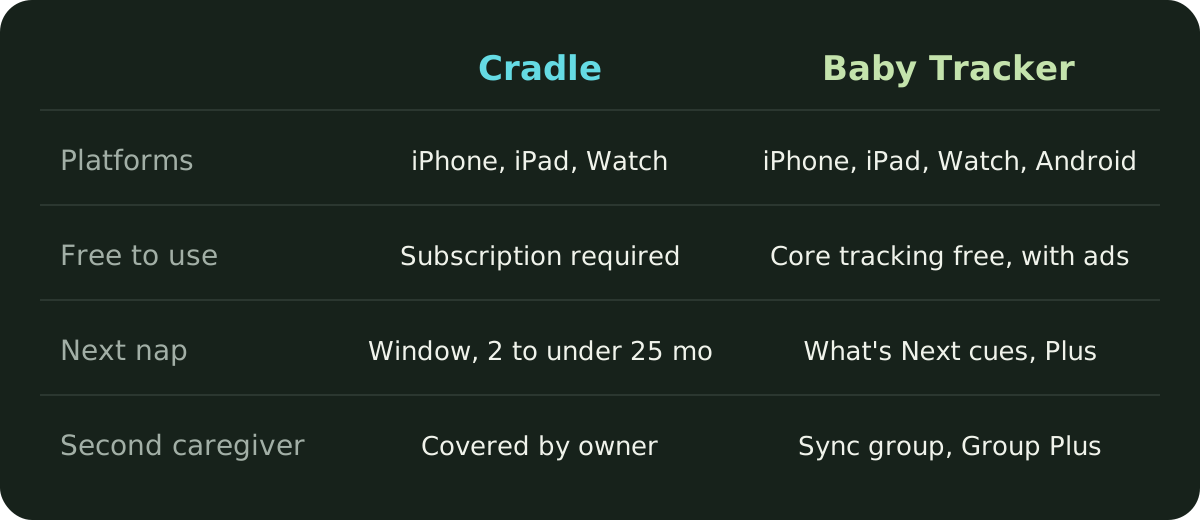
| Cradle | Baby Tracker (Nighp Software) | |
|---|---|---|
| Publisher | Zorest | Nighp Software LLC |
| Platforms | iPhone and iPad, with an Apple Watch companion | iPhone, iPad, Apple Watch, Apple Vision and Android |
| Free to use | Free to download; a subscription is required to use the app | Yes; the listing says core tracking stays free, with ads |
| Tracks | Sleep, night wakings, breastfeeding, bottles, pumping, solids, diapers, medicine, temperature, mood and notes | Breastfeeding, bottles, solids, pumping, naps and night sleep, diapers, growth, medications, vaccinations, temperature, milestones, photos and journal entries |
| Next nap suggestion | A next nap window for eligible babies aged two to under 25 months | What’s Next cues, including a wind-down window and an estimated length for the next nap; a Plus feature after a 3-day preview |
| Second caregiver | Invited caregivers are covered by the subscription of the parent who added the baby | Sync group with a shared email and password; Group Plus extends one Plus subscription to the whole group |
| Apple Watch | Start or end sleep, record nursing, add a bottle, log a diaper | Record and review activities; which activities is not stated |
| Growth and milestones | Not covered on our feature pages | Weight, height and head circumference on WHO-based charts; milestones with photos |
| Reports | Daily timeline and trends in the app | Day, week and month charts; PDF export; email or print reports |
| Price | See Cradle pricing | Remove Ads $4.99 once; Plus $5.99 a month or $49.99 a year, as listed on the App Store |
How do their nap suggestions differ?
Baby Tracker calls its suggestions What’s Next. The App Store listing says it uses on-device AI to turn recent logs into timing cues. Depending on what you’ve logged, it may show a likely wind-down window before sleep, an estimated length for the next nap or sleep, an approximate wake-up window, an estimated time for the next feed, and a suggested time to check the diaper. The listing says cues can start appearing after a few logs and that regular, complete logging makes them more personal. It doesn’t give an age range. What’s Next is optional, and you can hide it under Settings, then Preferences. Nighp says the cues are created on your device and that your baby’s logs aren’t sent to the company to generate them. It also says to use them alongside your baby’s own cues and your judgment, not as a fixed schedule, and that they’re not medical advice.
Cradle suggests one window: the next nap after the current wake-up. It’s for eligible babies aged two to under 25 months, and it looks at the previous 14 completed days of logged sleep, comparing similar naps (first naps with other first naps, for example) and the awake time before them. From four months it also estimates how long the nap might last. With too little history it gives a less personalized suggestion, and with no usable records it gives none. Some suggestions show an estimated reliability, which describes the records behind the suggestion and isn’t a measure of accuracy. Under two months, Cradle only observes sleep. The nap predictions page explains the method and when a window can be paused.
Neither app’s suggestion tells you when your baby will fall asleep. Treat it as a time to start watching for sleepy cues. If you want to see how these suggestions compare across more apps, our roundup of baby sleep apps with nap predictions and shared logs covers nine of them.
How does caregiver sharing work in each app?
Baby Tracker shares records through a sync group on what Nighp’s FAQ calls the Baby Tracker Server. On the device that holds the data, you go to Settings, then Sync Data between Devices, then Create a Group, and enter an email address and a password. The email has to be real, because a temporary password is sent there if you need to reset it. Other devices join the group with the same email and password. The FAQ says there’s no limit on devices in theory and that Nighp tested up to four in one group. The Android FAQ confirms that iPhone and Android devices can share one group. Baby Tracker also backs up to iCloud or Dropbox and can export a data clone to copy everything to another device, though backup and restore are hidden while sync is on.
In Cradle, the parent who added the baby invites a partner or caregiver from the baby’s Settings with a one-time invite code or QR code. Codes work once and expire after 15 minutes. That parent’s active subscription covers everyone using the shared log, so caregivers don’t need their own. Only the parent who added the baby can invite others or edit the profile. Each person can choose whether to get sleep updates when someone else logs sleep. See how shared tracking works or our guide to inviting a caregiver.
Baby Tracker’s group shares one login, so anyone with the email and password can join from any device, including an Android phone. Cradle’s invite is per person, and the owner decides who has access.
What does each app cost?
Cradle is free to download, and using it requires a subscription. Current prices are on the pricing page.
Baby Tracker is free to download and, according to its listings, free to use for core tracking. The App Store says it contains advertising, and the in-app purchase list shows a one-time Remove Ads purchase at $4.99. Baby Tracker Plus is an optional auto-renewing subscription that includes ad-free tracking and the personalized What’s Next sleep, feed and diaper cues. The App Store lists Plus at $5.99 a month or $49.99 a year. You can try What’s Next with a free 3-day preview, and the listing says no subscription is required to start it. Nighp says existing purchases, including Remove Ads, continue to work.
Nighp’s pages add two details that affect what you’d pay.
- With Group Plus, one Plus subscription unlocks Plus for everyone in your sync group, so a partner doesn’t need a second subscription to see the cues.
- Nighp’s iOS FAQ says the full version in-app purchase unlocks Apple Watch features and Siri Shortcuts and removes ads. The App Store listing describes Apple Watch and Siri Shortcuts without saying whether they need a purchase, so check in the app. The same FAQ says in-app purchases don’t work with Family Sharing, and points families who want that to a separate paid app, Baby Tracker Pro.
Prices vary by country. Check the in-app price before you subscribe to either app.
What does Baby Tracker include that Cradle doesn’t?
Baby Tracker covers more than daily care. It logs weight, height and head circumference and plots them on growth charts based on World Health Organization standards, with an adjusted-age option for premature babies. It records vaccinations and health notes, saves milestones with photos and journal entries, and shows charts by day, week or month. You can export records as a PDF and email or print reports for caregivers and healthcare professionals. It runs on Android as well as iPhone and iPad, so a family with mixed phones can share one group. It also offers Home Screen and Lock Screen widgets, Siri Shortcuts, and Quick Log, which lets you describe an activity to Siri in your own words on iOS 26 with Apple Intelligence turned on.
Its diaper log is detailed too: wet, dirty and mixed, with the last change shown at a glance. If diapers are your main reason for tracking, our post on the best app for tracking baby diapers looks at that in more depth.
What does Cradle focus on?
Cradle is narrower. It keeps sleep, feeds, diapers, pumping and night wakings in one daily timeline, with trends for sleep, naps and awake time, and it shows how long your baby has been awake or asleep next to the last feed and last diaper. Every invited caregiver sees and logs into the same record. The Apple Watch companion handles start and end of sleep, nursing, bottles and diaper changes from the wrist, and Live Activities follow a running nap on your iPhone’s Lock Screen. See baby sleep tracking in Cradle.
It doesn’t have growth charts, milestones, a journal, PDF reports or an Android app.
Which one is best for my family?
- Baby Tracker fits if you want a free log with no required subscription, if anyone in the family uses Android, or if growth charts, vaccinations, milestones and printable reports matter to you. Budget for Plus if you want the What’s Next cues after the preview ends, and remember Group Plus covers the whole sync group.
- Cradle fits if your family uses iPhone or iPad, you want every caregiver invited individually into one shared log under a single subscription, and you’d like a next nap window for an eligible baby built from your own logs, with an estimated reliability that says how much history sits behind it.
- Either works for everyday logging of sleep, feeds, pumping and diapers from a phone or an Apple Watch. Try a full day with both caregivers logging during Baby Tracker’s preview and any Cradle trial, and see which record you’d rather read at 3 am.
Sources
- Baby Tracker - Newborn Log by Nighp Software (App Store)
- Baby Tracker (Google Play)
- Baby Tracker (Nighp Software)
- Nighp Software home page
- Baby Tracker FAQ for iOS (Nighp Software)
- Baby Tracker FAQ for Android (Nighp Software)
- Cradle baby sleep tracking
- Cradle nap predictions
- Cradle shared baby tracking
- Cradle pricing