How do caregivers join one Cradle subscription?

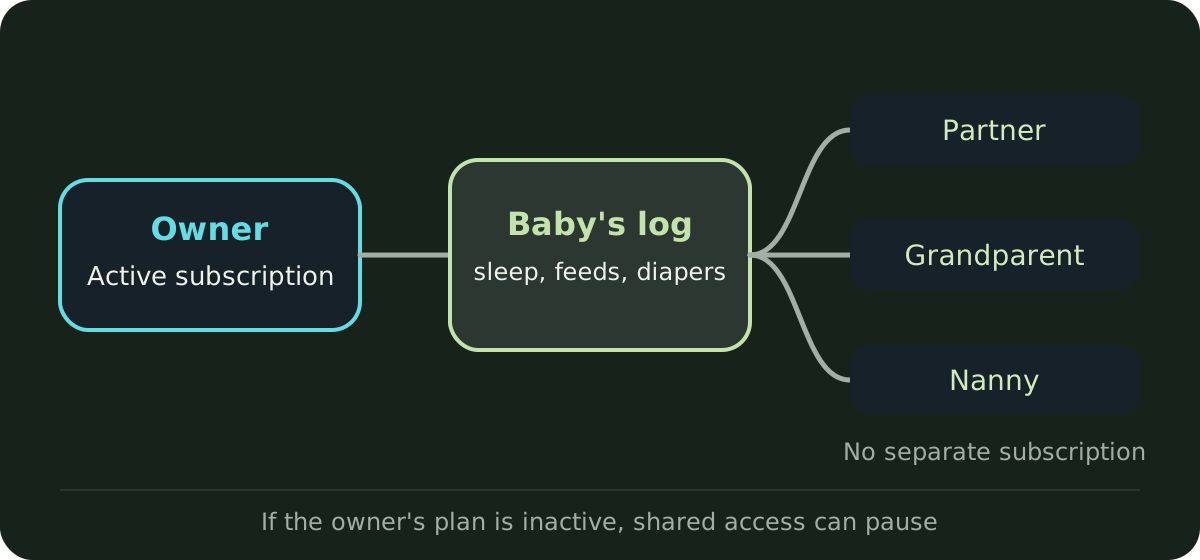
Caregivers join one Cradle subscription by being invited to the baby’s shared log. There’s no separate family plan to set up. The parent who added the baby to Cradle has the subscription, invites a partner or caregiver with a one-time code, and that parent’s active subscription covers everyone who joins the log. Caregivers can download Cradle and use the shared log without paying for their own subscription.
Cradle: Baby Sleep Tracker by Zorest is for iPhone and iPad, with an Apple Watch companion. It’s free to download, and using it requires a subscription. Current prices are on the pricing page.
Who needs to subscribe?
Only the baby’s owner: the parent who added the baby to Cradle. The pricing page says the owner’s active subscription covers invited caregivers tracking that baby, and that caregivers don’t need a separate subscription to use that shared log.
The owner is also the only person who can edit the baby’s profile and invite others. So subscription, profile and access all sit with one person. If you’re setting Cradle up as a couple, decide first who will add the baby, because that person manages the plan and the invitations. Our feature pages don’t describe moving a baby to a different owner, so if you need to, email [email protected].
How does a caregiver join?
- The owner adds the baby and saves the profile. Invitations only work once the baby has a saved profile.
- The owner selects the baby, opens Settings and taps Invite a caregiver, then chooses Partner or Caregiver.
- The caregiver installs Cradle, chooses the invite-code option, and enters the code or scans its QR code.
Each code works once and expires after 15 minutes, so send it when the other person is ready to join. Our guide to inviting a caregiver covers each step and what to do if a code doesn’t work.
What does a caregiver get?
Invited members can see and log care for that baby. Everyone shares the same sleep and daily care records, including feeds and diapers, and Cradle also supports pumping, solids, medicine, temperature, mood and notes. Anyone who uses the Apple Watch companion can log sleep, nursing, bottles and diapers from their wrist into the same log.
The pricing page lists what a subscription includes: sleep and daily care tracking with a daily timeline, next nap windows for eligible babies aged two to under 25 months when suitable sleep records and context are available, the shared care log, sleep sounds and the Apple Watch companion. A nap window isn’t guaranteed. Age, sleep history, current sleep state and care context decide whether one appears, and an estimated reliability, when shown, describes the records behind the suggestion rather than accuracy.
What a caregiver can’t do is edit the baby’s profile or invite anyone else. Those stay with the owner.
Can each caregiver choose their own notifications?
Yes. Each person chooses whether to get sleep updates when another caregiver logs sleep, and can set their own one-off or daily care reminders. The shared baby tracking page has more on handovers and updates.
What if we care for more than one baby?
Each baby has a separate profile, and each invitation is for one baby’s log. Invite caregivers to each baby they help with. Caregivers should switch to the right baby before reviewing the timeline or adding an entry, so naps and feeds stay with the right child.
What happens if the owner’s subscription ends?
The owner’s subscription has to stay active for the shared log to keep working. If it’s no longer active, access to the shared baby can pause until it’s active again.
A caregiver can’t fix this by subscribing themselves. Cradle’s pages say your own subscription can’t restore access to someone else’s baby when their plan is inactive. The owner needs to renew.
How do renewals and cancellations work?
Subscriptions renew automatically unless cancelled before renewal under the App Store’s rules. The owner manages or cancels the subscription in their Apple account’s subscription settings. Deleting Cradle from a phone doesn’t cancel it. Any trial or introductory offer available to you is shown before purchase, with its price, duration and renewal terms.
Where can I get help?
For subscription questions, email [email protected] and say which feature you need help with. For a smooth first day with a new caregiver, see how to hand over to the next caregiver.
Sources
This article is for general education and is not medical advice. Talk to your pediatrician about your baby's health.