How do I use Cradle's nap window as a guide, not a deadline?
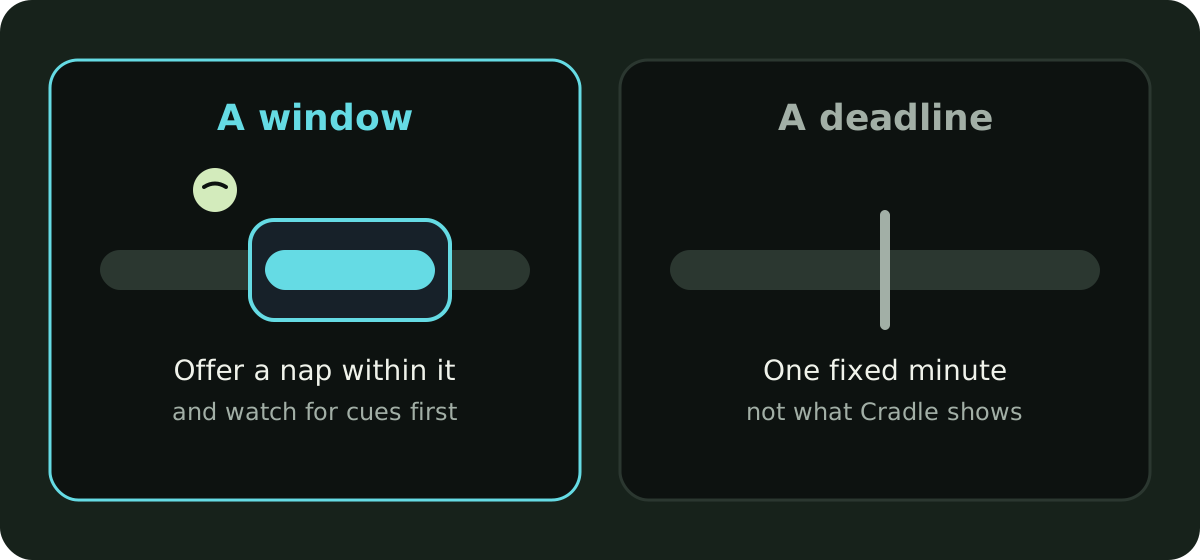
To use Cradle’s nap window as a guide, treat it as a possible time to offer a nap after the current wake-up, not an appointment. If your baby shows sleepy cues before the window opens, follow the cues. If the window opens and they are still content and alert, there is no need to rush. The window describes when a nap is likely to be welcome, based on your baby’s own recent sleep; it doesn’t guarantee when they will fall asleep or how long they will sleep.
Nap windows in Cradle: Baby Sleep Tracker by Zorest are available for eligible babies aged two to under 25 months, once there are suitable completed sleep records to work from. If you haven’t seen one yet, how to get your first nap window covers the setup.
What is the nap window actually telling me?
It is a range, not a moment. Cradle looks at the previous 14 completed days of recorded sleep, compares similar naps (first naps with other first naps, for example) and the awake time before each, and takes a range from those observations to suggest a window after the current wake-up. From four months, suitable history also shapes an estimated nap length.
So the window says: on recent days like this one, your baby was ready to nap somewhere in this range. It shows the next nap opportunity rather than a fixed plan for the whole day, and the nap predictions guide explains each step of the calculation.
What should I do if my baby seems tired before the window?
Follow the cues. The window came from past days, and today may be different: a shorter night, a busier morning, a cold coming on. Yawning, eye rubbing and looking away are the usual signs, and our post on what a wake window is goes through them.
Then log the nap as normal. The early nap tells Cradle what today looked like. Suggestions are recalculated as relevant records change, so the next window is based on what happened rather than on what was planned.
What if the window opens and my baby is wide awake?
Leave them be. Offer the nap when they seem ready, and if that is later than the window, log it at the real time. You don’t need to do anything in the app when a window passes without a nap. Keep logging, and the suggestions adjust.
The one thing to avoid is treating an earlier window as a fixed appointment and holding the day to it. Cradle’s own guidance is to keep the current sleep state up to date instead.
What does the estimated reliability score mean?
Some suggestions show an estimated reliability score. It describes the amount, consistency and type of logged history behind that suggestion. It does not measure accuracy. A score of 59/100 doesn’t mean the window is 59% accurate or that your baby has a 59% chance of sleeping in it; prediction accuracy has not been established by that score.
A low score is a reason to lean more on cues and less on the clock. A higher score means the suggestion rests on more consistent records, not that your baby has agreed to it.
Why does the window change during the day?
Because the records changed. Suggestions are recalculated as relevant records change, and two entries drive most of the movement:
- The morning wake-up. It is the reference point for the first awake stretch, so an unmarked or wrongly timed morning wake shifts everything after it.
- The current sleep state. If a timer is still running after your baby woke, Cradle can’t suggest the next window. Stop the timer and set the real wake time.
Correct missed or inaccurate entries when you notice them. Where the app asks you to confirm complete logging for a period, confirm only periods when all sleep was recorded.
What should I do when no window shows?
Keep logging. Age alone doesn’t make a baby eligible, and predictions may be paused when prematurity or medical and feeding context is unknown or restricted, or when illness or travel disrupts the usual baseline. An active sleep session, an unclear current sleep state, or no remaining nap window before bedtime can also prevent a suggestion.
None of that stops the record. Logging and history remain available, and a sick week or a trip logged honestly is still useful history once things settle. A subscription doesn’t guarantee a prediction either; age, sleep history, current sleep state and care context decide whether a window is available (the pricing page says the same).
Does the window guarantee a nap?
No. It suggests an upcoming nap opportunity, not a guaranteed sleep time or a full-day schedule. Follow your baby’s feeding and sleepy cues and use the window as a gentle guide. On a good day the window and the cues agree. On the other days, the cues win, and the log catches up tomorrow.
Sources
This article is for general education and is not medical advice. Talk to your pediatrician about your baby's health.