How do I get my first nap window in Cradle?

To get your first nap window in Cradle, add your baby’s date of birth, then log their sleep as it happens: naps, bedtime, night wakings and the morning wake-up. Nap windows are for eligible babies aged two to under 25 months, and they appear once Cradle has usable completed naps to work from. There is no fixed seven-day wait, but a brand-new profile won’t show a window straight away.
What ages can use Cradle nap predictions?
Nap windows are available for eligible babies from two to under 25 months. Under two months, Cradle focuses on observing sleep: you can log naps and nights and review the timeline, but it doesn’t suggest a window at that age. From four months, guidance becomes more personalized as suitable sleep history builds up, and it also helps shape estimated nap lengths.
Age alone doesn’t make a baby eligible. The other conditions are covered further down.
How do I set up Cradle for my first nap window?
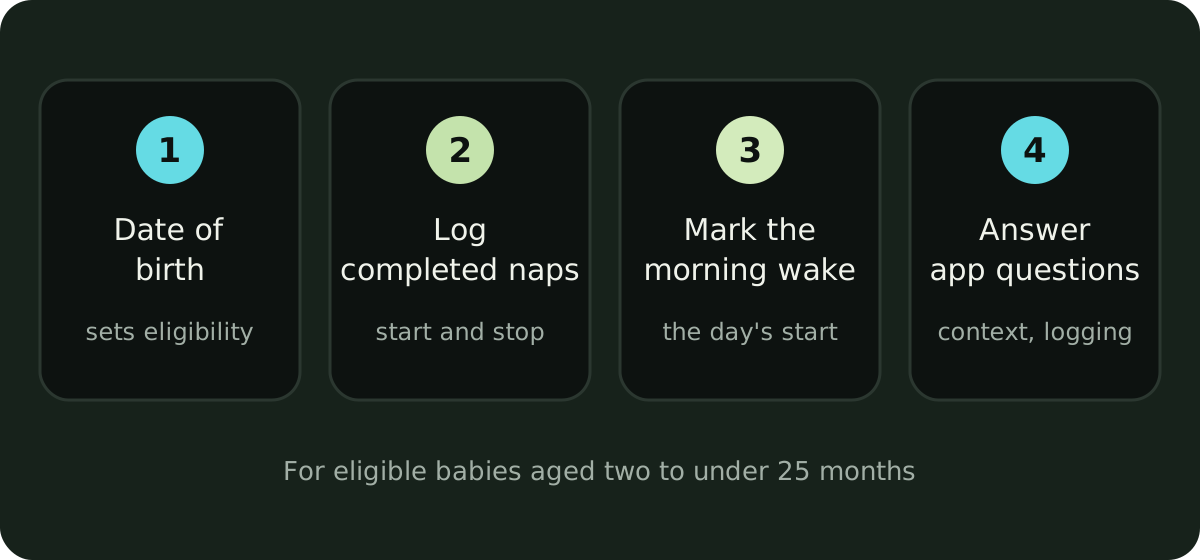
- Add your baby’s date of birth. Cradle uses age to decide which guidance is available.
- Log completed naps. Start a sleep timer when your baby settles and stop it when they wake. If you missed one, add it afterwards or edit the record. Completed naps give Cradle the awake time and nap length it needs.
- Mark the morning wake-up. It’s the reference point for the first nap.
- Answer the app’s questions. If Cradle asks about sleep context, or asks you to confirm that you logged everything for a period, answer it. Confirm complete logging only for periods when you really did record all sleep.
Then keep the current sleep state up to date. If a nap is still running in the app after your baby woke, Cradle can’t suggest the next window.
How long do I need to log before a nap window appears?
No set number of days. Eligibility depends on your baby’s age, their current sleep status and whether there are usable sleep records. Consistent logging helps the suggestion fit your baby better. With sparse history you might get a less personalized suggestion, or no window yet.
What doesn’t count is an empty log. Cradle doesn’t fall back on a generic age-based schedule when there are no usable records, so your first window comes from your own baby’s sleep.
How does Cradle calculate its next nap window?
Cradle looks at the previous 14 completed days of recorded sleep. With enough comparable history, it compares similar naps (first naps with other first naps, for example) and the awake time before each. It takes a range from those observations and suggests a window after the current wake-up. Recorded nap lengths help it estimate how long the nap might last.
With too few comparable naps, Cradle can use awake intervals from other logged naps, or the clock times of past naps. Those fallback suggestions are less personalized. The nap predictions guide explains each step.
Why is Cradle not showing a nap prediction yet?
If you’ve been logging and still see no window, check these:
- Your baby needs to be at least two months old and under 25 months.
- Cradle needs completed naps in its 14-day look-back.
- An active sleep session, or an unclear current sleep state, can block a suggestion. Stop any timer that’s still running and mark the latest wake-up.
- If there’s no nap window left before bedtime, none is shown.
- Predictions may be paused when prematurity or medical and feeding context is unknown or restricted, or when illness or travel disrupts your baby’s usual pattern.
Logging, the timeline and your history stay available the whole time, so nothing you record is wasted while you wait.
What does the estimated reliability score mean?
Some suggestions show an estimated reliability score. It describes the amount, consistency and type of logged history behind that suggestion. It doesn’t measure accuracy. A score of 59/100 doesn’t mean the window is 59% accurate, or that your baby has a 59% chance of sleeping in it.
How should I use my first nap window?
Read the window as a possible time to offer a nap, then watch your baby. It doesn’t promise when they’ll fall asleep or how long they’ll sleep. If they show sleepy cues earlier, follow the cues. If they’re still content and alert when the window opens, there’s no need to rush. Our post on what a wake window is covers the cues to look for.
Suggestions are recalculated as your records change, so keep logging as the routine shifts. If someone else shares the care, they can log in the same record. See how to invite a partner or caregiver.
Sources
This article is for general education and is not medical advice. Talk to your pediatrician about your baby's health.