How does Cradle compare with Baby Connect?
Cradle publishes this comparison. App details checked on November 9, 2026.
Baby Connect suits families who want one log across every kind of device, including Android phones, a web browser, Alexa and Apple Watch, who care about growth percentiles, vaccines, milestones and exports, or who track several children or run a childcare setting. Cradle suits iPhone and iPad families who want sleep, feeds and diapers in one shared timeline for every caregiver, with a next nap window for eligible babies, and who are fine with a required subscription. Both need a subscription for ongoing logging, and in both, one subscription covers the caregivers who share the log.
This post is about Baby Connect: Newborn Tracker by Seacloud Software LLC, the app on the App Store at id326574411 and on Google Play as com.seacloud.bc. Seacloud Software also publishes Daily Connect, a separate app for daycares and preschools, which isn’t covered here.
We publish Cradle. Everything below about Baby Connect comes from its App Store and Google Play listings and the official website linked from the App Store (babyconnect.com), including its support FAQ, on the date shown above. “Not stated” means we couldn’t find the detail there.
How do Cradle and Baby Connect compare?
| Cradle | Baby Connect (Seacloud Software) | |
|---|---|---|
| Publisher | Zorest | Seacloud Software LLC |
| Platforms | iPhone and iPad, with an Apple Watch companion | iPhone, iPad, Apple Watch, Apple Vision, Android phones and tablets, and a web app |
| Voice logging | Not covered on our feature pages | Siri and Alexa; the gifting page also names Google Assistant |
| Free to use | Free to download; a subscription is required to use the app | 7-day free trial for new users; after that a subscription is needed to save entries, with read-only access without one |
| Tracks | Sleep, night wakings, breastfeeding, bottles, pumping, solids, diapers, medicine, temperature, mood and notes | Feeds, nursing, pumping, solids, sleep, diapers, potty training, medicine, vaccines, temperature, weight, height, head size, milestones, photos and diary entries |
| Next nap suggestion | A next nap window for eligible babies aged two to under 25 months | Not stated; the site describes scheduled nap durations, reminders and alarms |
| Second caregiver | Invited by the parent who added the baby, with a one-time code; covered by that parent’s subscription | Added by email; each caregiver creates an account; the listing says the subscription is valid for all family members and caregivers |
| Number of children | A separate profile for each baby | Family plan up to 5 children; Professional plan up to 15 |
| Growth charts | Not covered on our feature pages | Percentiles using CDC or WHO tables |
| Exports and reports | Daily timeline and trends in the app | Charts and reports; CSV or HTML export by email |
| Price | See Cradle pricing | Family $6.99, Family 6 months $29.99, Family 12 months $49.99, Professional $14.99, as listed on the App Store |
How does caregiver sharing work in each app?
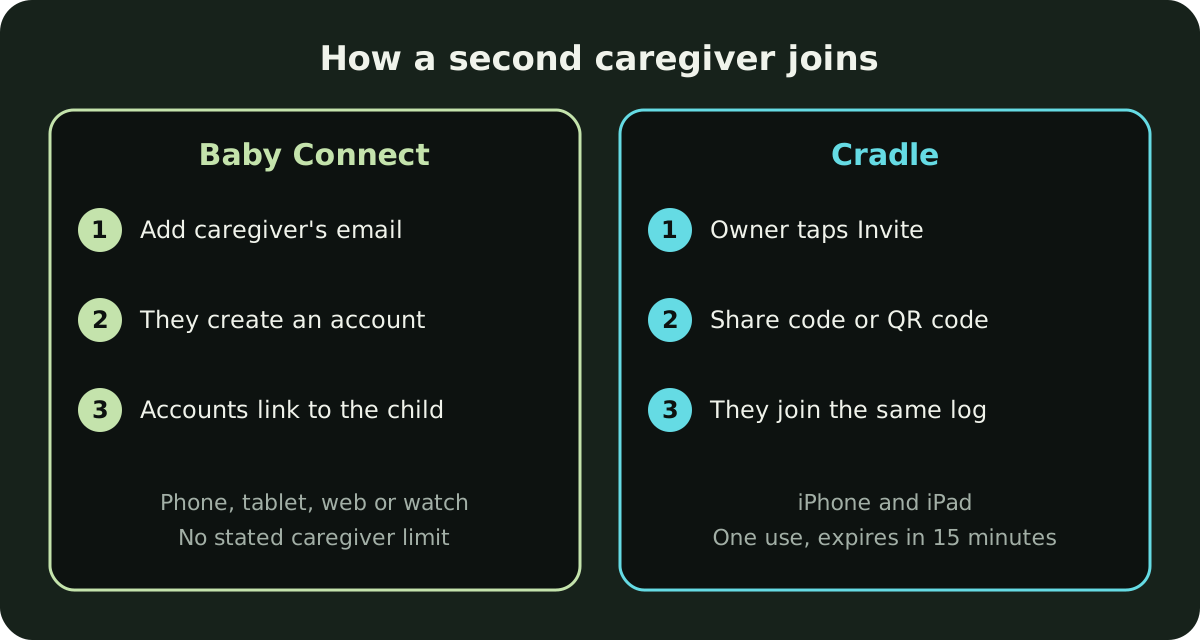
In Baby Connect, you add a caregiver from the child’s profile. The support FAQ says to tap the child’s name, then Add Parent/Caregiver, and enter the caregiver’s email; on the web app it’s under Settings. The caregiver then creates their own Baby Connect account with that same email, or uses the invitation code from the invitation email. Each linked account can view and add entries for the child. The FAQ says there’s no limit on how many family members or caregivers can be linked to a child, and the Google Play listing mentions customizing access levels for different users and leaving notes for caregivers. Sync happens when you open the app, when you post an entry, and every 5 minutes, or less often if you choose low-frequency sync.
The App Store listing says the subscription is valid across all devices and family members or caregivers, so a nanny or grandparent doesn’t need their own plan.
In Cradle, the parent who added the baby opens the baby’s Settings, taps Invite a caregiver, chooses Partner or Caregiver, and shares an invite code or QR code. Each code works once and expires after 15 minutes. That parent’s active subscription covers everyone using the shared log, and only that parent can invite others or edit the baby’s profile. If their subscription lapses, shared access can pause. Each person chooses whether to get sleep updates when someone else logs sleep. See how shared tracking works or our step-by-step guide to inviting a caregiver to Cradle.
In practice, Baby Connect links caregivers by email account and works from almost any device, including a computer at a nanny’s home. Cradle uses short-lived, single-use codes, and everyone needs an iPhone or iPad.
How do their sleep tools differ?
Baby Connect logs naps and overnight sleep with timers. Its sleep page describes scheduled nap durations, reminders to check in, alarms, a dark mode, notes on where the baby slept, and starting or stopping sleep timers with Siri or Alexa. Reports cover total hours slept, the longest night’s sleep and the number of daily naps, and a recent Highlights update added monthly charts including “sleep personality profiles”. None of its pages we checked describe a predicted next nap time, so we’ve marked that “Not stated”.
Cradle logs sleep with a running timer, including bedtime, night wakings and the morning wake-up, in the same timeline as feeds and diapers. For eligible babies aged two to under 25 months, it suggests a window for the next nap after the current wake-up, based on the previous 14 completed days of logged sleep. With too little history the suggestion is less personalized, and with no usable records there is none. Some suggestions show an estimated reliability, which describes the records behind the suggestion, not its accuracy. Under two months, Cradle only records sleep. A window is a time to start watching for sleepy cues, not a guarantee. The nap predictions page explains the method.
What does each app cost?
Cradle is free to download, and using it requires a subscription. Current prices are on the pricing page.
Baby Connect is free to download with a 7-day free trial for all new users. After the trial, its App Store listing says a subscription is needed to save entries, though read-only access stays available without one. The App Store in-app purchase list shows Family at $6.99, Family (6 months) at $29.99, Family (12 months) at $49.99 and Professional at $14.99. The App Store doesn’t say the billing period for the $6.99 and $14.99 items; Google Play describes monthly or annual options. The Family plan covers up to 5 children and the Professional plan up to 15. Subscriptions auto-renew unless cancelled at least 24 hours before the period ends. Baby Connect also sells prepaid six- or twelve-month subscriptions as gifts from inside the app.
Prices vary by country. Check the in-app price before you subscribe to either app.
What does Baby Connect include that Cradle doesn’t?
The biggest difference is reach. Baby Connect runs on iPhone, iPad, Apple Watch, Android phones and tablets and in a web browser, so a caregiver without an iPhone, or a grandparent who prefers a computer, can still log. Alexa and Siri can record activities by voice.
It also covers more of a child’s life beyond daily care: potty training and accidents, vaccines and doctor visits, weight, height and head size with CDC or WHO percentiles, milestones with photos and diary entries, and over 100 built-in activity descriptions. Its reports can be exported as CSV or HTML files by email to share with a pediatrician. You can save one entry for several children at once, which helps with twins or siblings; our post on the best baby tracker app for twins looks at that in more depth. The Professional plan covers up to 15 children. One gap its FAQ notes: there’s no bulk import from another app, so switching means starting fresh.
What does Cradle focus on?
Cradle covers less ground. It keeps sleep, feeds, diapers, pumping and night wakings in one daily timeline, with trends for sleep, naps and awake time, and it shows how long your baby has been awake or asleep next to the last feed and last diaper. Every invited caregiver sees and logs into the same record. The Apple Watch companion handles starting and ending sleep, nursing, bottles and diaper changes from the wrist, and Live Activities follow a running nap on your iPhone’s Lock Screen. See baby sleep tracking in Cradle.
It doesn’t have growth charts, milestones, exports, voice assistants, a web app or an Android app.
Which one is best for my family?
- Baby Connect fits if anyone who cares for your baby uses Android or a computer, if you want growth percentiles, vaccine records, milestones and exportable reports, or if you’re tracking several children, including as a nanny or childcare provider. It’s also the better fit if voice logging through Alexa matters to you.
- Cradle fits if everyone in your household uses iPhone or iPad, you want caregivers added one at a time with single-use codes under one subscription, and you’d like a next nap window for an eligible baby built from your own logs, with an estimated reliability that says how much history sits behind it.
- Either works for everyday logging of sleep, feeds, pumping and diapers with several caregivers. If your circle includes grandparents or a nanny, our roundup of baby tracker apps for nannies and grandparents compares more options. Try a full day with every caregiver logging during Baby Connect’s trial and any Cradle offer shown in the app, and see which record you’d rather read at 3 am.
Sources
- Baby Connect: Newborn Tracker by Seacloud Software LLC (App Store)
- Baby Connect: Newborn Tracker (Google Play)
- Baby Connect official website
- Baby Connect sleep tracking
- Baby Connect integrations
- Baby Connect reports
- Baby Connect support and FAQ
- Cradle shared baby tracking
- Cradle baby sleep tracking
- Cradle nap predictions
- Cradle pricing