How do baby apps estimate the next nap?
Cradle publishes this comparison. App details checked on November 9, 2026.
Baby apps that suggest the next nap mostly start from one of two places: typical wake windows for a baby’s age, adjusted as you log, or your baby’s own recent sleep records. Some then plan the whole day, while others suggest only the next nap. Huckleberry and Glow Baby say they begin with age-based wake windows. Napper, Baby Daybook and Med ART Studios describe full-day schedules from your logs. Baby Tracker by Nighp Software and Cradle build cues from recent records. None of them can promise when a baby will actually fall asleep.
We publish Cradle. Everything below about other apps comes from each company’s own website or App Store listing on the date shown above. “Not stated” means we couldn’t find the detail there. Most companies say what goes into their suggestions but not the exact method.
If you’re choosing an app that pairs predictions with a shared caregiver log, start with our roundup of baby sleep apps with nap predictions and shared logs.
How do the methods compare?
| App | What it suggests | Starting point | Uses your logs | Age stated | Plan |
|---|---|---|---|---|---|
| Huckleberry (SweetSpot) | Next sleep window; recalculates the day after a short nap or early start | Age-appropriate wake windows | Yes; one logged sleep is enough for a first prediction | 2+ months | Plus or Premium |
| Glow Baby | Next nap and next feed | Age-dependent wake windows | Yes, “past habits” | Not stated | Premium |
| Napper | Personalized daily schedule | Baby’s sleep rhythms and research on infant sleep | Yes: sleep, feeds, diapers, night wakings | Not stated | Subscription; 7-day trial on its website |
| Baby Daybook | Full-day schedule: naps, bedtime, awake periods | Recent activity | Yes | Not stated | Premium, per its Premium page |
| Med ART Studios (Sleep Forecast) | Next nap, wake-up and daily sleep rhythm | “15+ years of real Sprout sleep data” | Updates as you track | Not stated | Not stated |
| Baby Tracker by Nighp (What’s Next) | Wind-down window, next nap length, wake-up window, next feed, diaper check | Recent logs, processed on your device | Yes; cues can appear after a few logs | Not stated | Plus, after a 3-day preview |
| Cradle | Next nap window after the current wake-up | Previous 14 completed days of your logged sleep | Yes; compares similar naps | Two to under 25 months | Subscription required |
| Nara Baby | No prediction; nap reminders | Wake windows you set | Wake Windows reminders adjust to wake-up time | Not stated | Subscription after a 7-day trial |
Which apps start from wake windows for age?
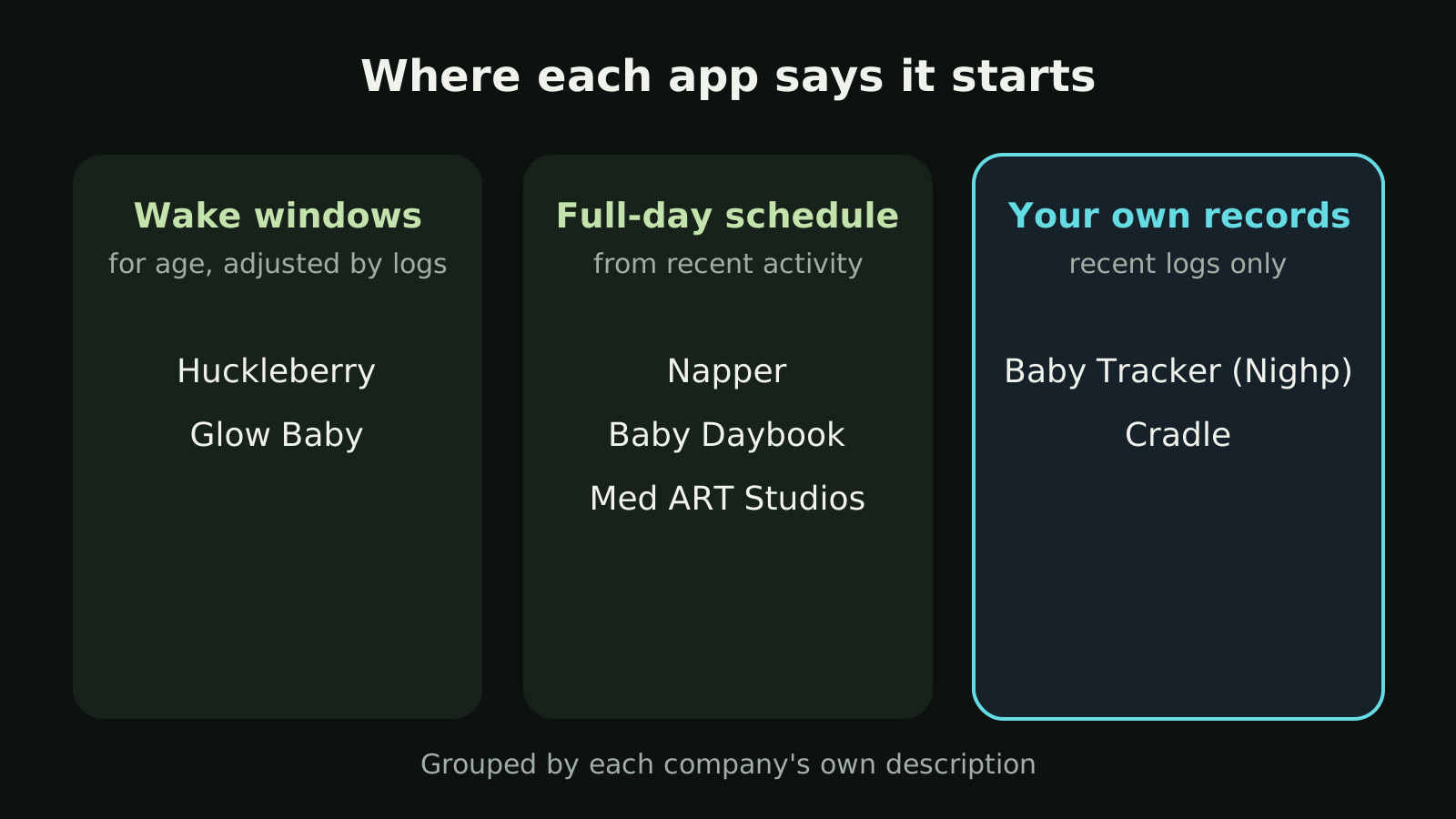
Huckleberry’s SweetSpot page says it starts with age-appropriate wake windows and then adjusts to your child’s tracked patterns. One logged sleep is enough for a first prediction. Huckleberry says a short nap or an early morning recalculates the rest of the day, and that the predictions were built with input from its team of pediatric sleep specialists. SweetSpot is for babies 2 months and older and sits in the Plus and Premium plans. If your baby’s wake windows run shorter or longer than the defaults, Huckleberry’s guide describes Custom SweetSpot, where you nudge the windows or type in your own. The same guide asks you to treat SweetSpot like a weather forecast and keep watching for sleepy cues.
Glow Baby’s FAQ says its forecasts for the next feed and nap are “based on your baby’s age-dependent wake windows and past habits.” Forecasts are a Premium feature. Glow doesn’t say more about the method or give an age range.
The upside of this approach is a suggestion from the first day of logging. The trade-off is that early suggestions lean on averages for age, not on your baby.
Which apps plan the whole day?
Napper describes a personalized sleep schedule based on your baby’s natural sleep rhythms and research on infant sleep, which adjusts as your baby’s sleep needs change. Its website says logging nursing, diapers and bottle feeds as well as sleep makes “the picture” sharper. It doesn’t name an algorithm, say whether it uses wake windows, or give an age range.
Baby Daybook says its sleep predictions “use recent activity to suggest nap times and bedtime windows,” with a full daily schedule of naps, bedtime and awake periods. Its Premium page puts this in Premium. Its App Store listing adds that predictions draw on your baby’s sleep patterns and “expert-backed recommendations.” No age range is given.
Med ART Studios, whose Baby Tracker & Newborn Log was formerly called Sprout, says Sleep Forecast predicts the next nap, wake-up and daily sleep rhythm, is built from 15 or more years of Sprout sleep data, and updates as you track. The listing doesn’t give an age range or say which plan includes it. Our comparison with Cradle has more detail.
A full-day plan helps if you like to know roughly when bedtime will fall. It also means one long or short nap can move everything after it, so expect the plan to shift during the day.
Which apps build suggestions from your baby’s records?
Baby Tracker by Nighp Software calls its feature What’s Next. The App Store listing says it turns recent logs into timing cues using on-device AI, and that your logs aren’t sent to Nighp to make them. Cues can start after a few logs, and the listing says regular, complete logging makes them more personal. It doesn’t explain how the cues are calculated or give an age range. What’s Next comes with Plus after a free 3-day preview, and Nighp calls the cues “guidance, not a schedule.”
Cradle: Baby Sleep Tracker by Zorest suggests one window, the next nap after the current wake-up. It looks at the previous 14 completed days of recorded sleep. When there’s enough comparable history it compares similar naps, such as first naps with other first naps, and the awake time before them, then uses the range of those observations to suggest a window. From four months, suitable history also helps estimate how long the nap might last. With too few comparable naps it falls back to awake intervals from other naps or the clock times of past naps, which is less personalized. With no usable records it shows nothing; it doesn’t make up a schedule for age.
Cradle’s nap windows are for eligible babies aged two to under 25 months who have suitable sleep history. Under two months, Cradle only records sleep. Some suggestions show an estimated reliability score, which describes how much consistent history supports the suggestion. It isn’t a measure of accuracy. The nap predictions page explains when a window can pause, for example during illness or travel.
Working from your own records fits a baby whose rhythm doesn’t match the averages. The cost is that you need some logging first, and gaps in the log weaken the suggestion.
What about apps that remind you instead of predicting?
Nara Baby doesn’t describe a prediction. Its listing says you can “create a nap routine based on wake windows,” and its FAQ describes recurring nap reminders: you choose the number of naps and daytime hours, and a Wake Windows schedule adjusts to when your child woke up, while a Fixed Times schedule doesn’t. Both include a bedtime reminder. You decide the windows; the app does the timing. Nara offers a 7-day free trial, then a subscription to keep adding entries.
Why does the method matter?
- Age-based starting points give you something on day one but may not fit a baby who naps unusually short or long.
- Record-based suggestions take some logging first and get thinner when you miss entries.
- A full-day schedule is easy to plan around and shifts as the day goes. A next-nap-only suggestion is narrower and doesn’t try to forecast bedtime.
- Age limits vary. Huckleberry says 2+ months and Cradle says two to under 25 months. The others don’t state one.
Whichever approach you choose, a suggested window is a time to start watching your baby, not a time they will sleep. Our post on using Cradle’s nap window as a guide covers that in practice, and what a wake window is explains the idea most of these apps build on.
Which approach fits my family?
- If you want suggestions from the first day and are happy to tweak them, Huckleberry’s SweetSpot starts from age-based wake windows and lets you set custom ones. See how Cradle and Huckleberry differ.
- If you’d like a plan for the whole day, Napper, Baby Daybook and Med ART Studios describe full-day schedules. See our Napper comparison and Baby Daybook comparison.
- If keeping data on your phone matters to you, Nighp says What’s Next runs on your device. More in Cradle and Baby Tracker by Nighp compared.
- If you’d rather set the wake windows yourself, Nara Baby’s reminders do that without predicting. See Cradle and Nara Baby.
- If you want one next-nap window built only from your baby’s own comparable naps, with the method and its limits written down, that’s how Cradle works, for eligible babies aged two to under 25 months on iPhone and iPad.
Before you pay for any of them, check the age range and which plan includes the feature on the app’s listing for your country, and log for a few days during a trial to see whether its suggestions match your baby’s cues.
Sources
- SweetSpot (Huckleberry)
- How to use our magical sleep predictor, SweetSpot (Huckleberry)
- Huckleberry: Baby Tracker (App Store)
- Napper: Baby Sleep Tracker (App Store)
- Napper official website
- Baby Daybook official website
- Baby Daybook Premium
- Baby Daybook - Newborn Tracker (App Store)
- Glow Baby app (Glow)
- Baby Tracker & Newborn Log by Med ART Studios (App Store)
- Baby Tracker - Newborn Log by Nighp Software (App Store)
- Nara Baby & Pregnancy Tracker (App Store)
- Nara Baby & Pregnancy Tracker FAQs (Nara Organics)
- Cradle nap predictions