What is the best app for two parents to share one baby log?
Cradle publishes this comparison. App details checked on November 9, 2026.
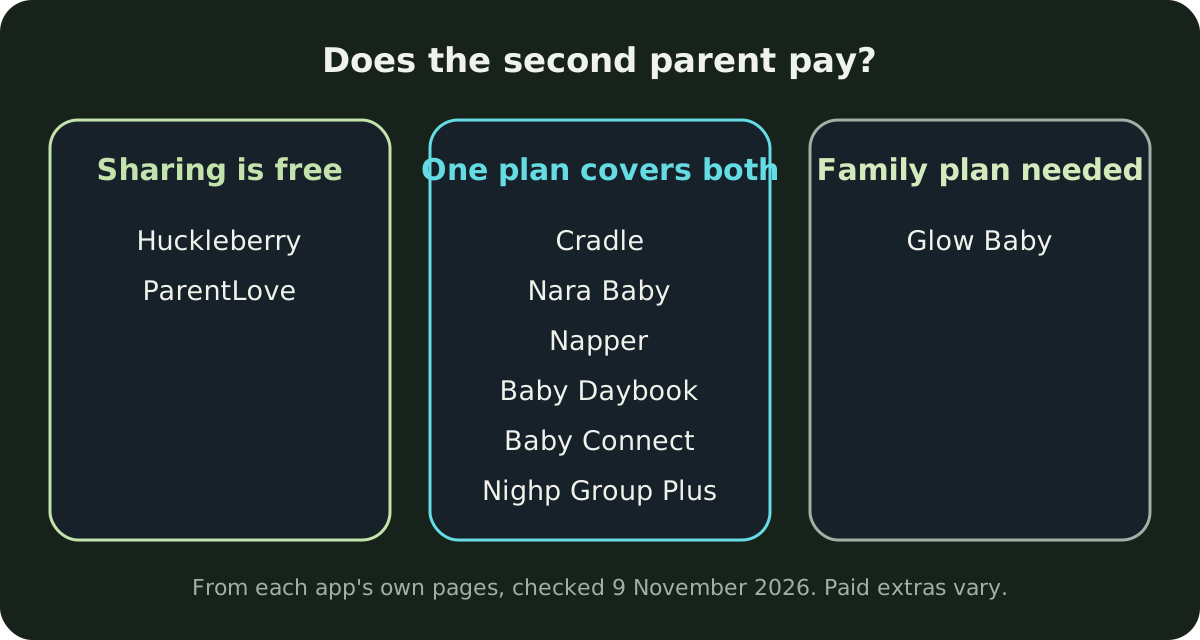
Most iPhone baby trackers let two parents log into one shared record, so the best one for you depends on three things: how your partner joins, whether they have to pay, and whether you both use iPhones. On each company’s own pages, Huckleberry and ParentLove list partner sync as a free feature. Nara Baby, Napper, Baby Daybook and Baby Connect say one subscription covers the family. Glow Baby needs its Premium Family plan before you can add a caregiver. Cradle: Baby Sleep Tracker by Zorest has the parent who added the baby invite the other parent with a one-time code, and that parent’s subscription covers them, but it runs only on iPhone and iPad.
We publish Cradle. Everything below about other apps comes from their own App Store listings, websites and help pages on the date shown above. “Not stated” means we couldn’t find the detail there, not that the feature is missing.
If you also want a grandparent or nanny in the log, our guide to baby tracker apps for nannies and grandparents covers that. This post is about the two of you.
What should two parents look for in a shared baby log?
At 3 am, whoever is up needs to know when the baby last ate, slept and had a diaper change, without waking the other person to ask. So the basics are a record that updates on both phones, logging that’s quick for either parent, and no surprise bill for the second phone.
Then come the questions that split couples. Does each parent get their own login, or do you share one? Can an iPhone parent and an Android parent use the same log? Do both of you have equal control, or does one person own the baby’s profile? And can you see what your partner logged without being buzzed every time they do?
How does the second parent join each app?
Cradle: the parent who added the baby opens the baby’s Settings, taps Invite a caregiver, chooses Partner, and sends the invite code or shows its QR code. The other parent picks the invite-code option in Cradle and enters or scans it. A code works once and expires after 15 minutes. Our step-by-step guide walks through it.
Huckleberry: its FAQ says caregivers “can sign in to the same account on each phone”, and updates sync between devices. No separate invite step is described.
Baby Daybook: its website says to add your partner or nanny to the caregivers list. How the invite reaches them isn’t described.
Glow Baby: its help centre says to open the Me page (More on Android), tap + Caregiver and enter your partner’s email. Your partner downloads the app, taps login, enters that email and creates a password. Partners are added to each baby profile separately.
ParentLove: you send a private invite link, and entries sync in real time. The App Store notes mention a Join Family option at sign-in.
Baby Tracker by Nighp Software: you create a sync group on the device that holds the data, under Settings, Sync Data between Devices, with an email address and password. Your partner’s phone joins with the same email and password.
Napper: its listing says you can share your baby “and subscription” with as many caregivers as needed. The join steps aren’t stated.
Nara Baby: you send an invite from the Family tab, and your partner gets an email to create an account. Once added, the FAQ says, they have “100% full access in the app the same way that you do”.
Baby Connect: its listing says updates can be shared with family and caregivers. The join steps aren’t stated, and its website wouldn’t load for us, so these facts come from its App Store listing only. Our Cradle and Baby Connect comparison has more detail.
Does the second parent have to pay?
| App | How your partner joins | Partner pays? | Own login or shared? | iPhone and Android couple |
|---|---|---|---|---|
| Cradle | One-time invite code or QR code | No, the owner’s subscription covers invited caregivers | Joins from their own Cradle app with the code | No, iPhone and iPad only |
| Huckleberry | Signs in to the same account | Multi-caregiver sync is a free feature | Shared: same account on each phone | Yes, App Store and Google Play |
| Baby Daybook | Added to the caregivers list | No, connected caregivers get Premium; family sync is a Premium feature | Not stated | Yes, one subscription works on Android and iOS |
| Glow Baby | Email invite from + Caregiver | A Premium Family plan is needed to add a caregiver | Own login: the invited email and their own password | Yes, iOS and Android |
| ParentLove | Private invite link | No, unlimited sharing is free; ProFamily shares Pro tools | Not stated beyond the invite link | Yes, iOS and Android; iPhone only on Apple |
| Baby Tracker (Nighp) | Joins a sync group with its email and password | Core tracking free; Group Plus extends one Plus plan to the group | Shared: one group email and password | Yes, iOS and Android devices share one group |
| Napper | Not stated | No, the subscription is shared with caregivers | Not stated | Yes, App Store and Google Play |
| Nara Baby | Email invite from the Family tab | No, one payment covers the caregiver circle | Own account, created from the email invite | FAQ mentions Android phones and Google Play billing |
| Baby Connect | Not stated | Subscription valid across family members and caregivers | Not stated | Android not stated on the listing; says it runs on web browsers |
Grouped by what the second parent pays:
- Free to share: Huckleberry lists “Sync with multiple caregivers across devices” among its free features, and ParentLove says core features, “including unlimited caregiver sharing”, are free. ParentLove’s paid tools are one-time purchases, and sharing them with every caregiver needs ProFamily.
- One payment for both: Cradle’s pricing page says the baby owner’s active subscription covers invited caregivers. Nara Baby, Napper, Baby Daybook and Baby Connect say the same of theirs. Nighp’s core tracking is free, and Group Plus unlocks Plus for everyone in the sync group from one subscription.
- Extra for the partner: Glow Baby’s tracker is free, but its help centre says adding a second caregiver needs the Glow Premium Family plan, which Glow’s site puts at around $90 a year.
One catch with “one payment covers both”: if the paying parent’s plan lapses, access can change for both of you. Cradle’s pricing page says shared access can pause until the owner’s subscription is active again. Nara’s FAQ says an unsubscribed family becomes read only until its paying member subscribes, and Baby Connect’s listing says the app is read only without a subscription after the 7-day trial.
What if one parent uses Android?
Then Cradle won’t work for you both. It runs on iPhone and iPad, with an Apple Watch companion, and there’s no Android app.
Huckleberry, Glow Baby, ParentLove, Baby Daybook, Napper and Nighp’s Baby Tracker all link to or describe an Android version. Nighp’s FAQ says iOS and Android devices can join the same sync group, and Baby Daybook says one subscription works on both. Nara Baby’s FAQ gives Android instructions and Google Play billing, though we couldn’t find a plain availability line. Baby Connect’s listing doesn’t mention Android but says it runs on “all platforms, including web browsers”.
Who controls the baby’s profile?
Some apps treat both parents as equals; others give one parent the keys.
- Equal access: Nara Baby gives every added member full access, though only the account that created the family can remove caregivers. Huckleberry and Nighp’s Baby Tracker share one login, so both of you have the same account.
- An owner and members: in Cradle, only the parent who added the baby can edit the baby’s profile and invite others; the invited parent can see and log care for that baby. ParentLove describes per-child, per-feature access on its invite links.
- Not stated: Baby Daybook, Glow Baby, Napper and Baby Connect.
If you both want to edit everything, pick an equal-access app, or decide up front which of you sets up the baby.
Will I get a notification every time my partner logs something?
It depends on the app and your settings. Cradle lets each parent choose whether to get sleep updates when another caregiver logs sleep, so the parent who’s off duty can stay quiet. ParentLove’s release notes say an active breastfeeding session now syncs across family members. Most of the other pages we checked don’t describe partner notifications, so test it during a trial.
Which app fits which couple?
- If one of you uses Android: Huckleberry, ParentLove, Glow Baby, Baby Daybook, Napper or Nighp’s Baby Tracker. Cradle is iPhone and iPad only.
- If you don’t want to pay anything: Huckleberry and ParentLove both list partner sharing as free, and Nighp’s core tracking is free. See how Cradle and ParentLove compare or how Cradle and Baby Tracker by Nighp compare.
- If you want one subscription that clearly covers both of you: Nara Baby, Baby Daybook, Napper and Cradle all say so. Our pages on Nara Baby and Cradle and Baby Daybook go further.
- If you mostly want sleep timing and are happy to share one account: Huckleberry’s paid tiers add SweetSpot sleep predictions; see Cradle and Huckleberry. Napper shares its subscription with every caregiver; see Cradle and Napper.
- If you’re both on iPhone and want sleep, feeds, diapers and pumping in one timeline, with nap windows for eligible babies aged two to under 25 months (they need suitable sleep history and aren’t guarantees), that’s what Cradle does. See shared baby tracking.
What should we test before we commit?
- Set the app up on both phones during the free period, and log a feed on one phone while the other is open. See how fast it shows up.
- Have the second parent log a night feed one-handed, in the dark.
- Check whether you each have your own login, and who can edit the baby’s profile.
- Read the in-app purchases for your country and look for wording about family or caregiver plans.
Whichever app you choose, agree on one habit: log each care moment when it happens, so the parent coming on duty inherits a full picture. Our guide to handing over to the next caregiver has more on that.
Sources
- Cradle shared baby tracking
- Cradle pricing
- Huckleberry: Baby Tracker (App Store)
- Huckleberry free features and FAQ (Huckleberry)
- Huckleberry pricing
- Baby Daybook - Newborn Tracker (App Store)
- Baby Daybook app
- Baby Daybook Premium
- Glow Baby Tracker & Growth App (App Store)
- Glow Baby app (Glow)
- How do I add my partner to Glow Baby? (Glow help centre)
- Do I have to have a premium subscription to add a caregiver? (Glow help centre)
- ParentLove: Baby Tracker (App Store)
- ParentLove baby tracker (Coquisoft)
- Baby Tracker - Newborn Log by Nighp Software (App Store)
- Baby Tracker FAQ (Nighp Software)
- Baby Tracker Android FAQ (Nighp Software)
- Napper: Baby Sleep Tracker (App Store)
- Napper (official website)
- Nara Baby & Pregnancy Tracker (App Store)
- Nara Baby & Pregnancy Tracker FAQs (Nara Organics)
- Baby Connect: Newborn Tracker (App Store)