How do I set up Cradle for a newborn under two months?
To set up Cradle for a newborn under two months, add your baby’s profile with their real date of birth, then log sleep, feeds and diapers as they happen and use the daily timeline to see how the days are going. Under two months, Cradle focuses on observing sleep: it doesn’t suggest nap windows at that age, but logging, the timeline, sharing with a partner or caregiver, and the Apple Watch companion all work as normal. The records you build now stay in your baby’s history.
Cradle: Baby Sleep Tracker by Zorest runs on iPhone and iPad, with an Apple Watch companion. It’s free to download and needs a subscription (see the pricing page). If you want the basics of logging a nap first, how to start tracking sleep in Cradle covers the timer and editing entries.
What does Cradle do differently for a baby under two months?
Only one thing changes: there’s no nap window. Nap windows are for eligible babies from two to under 25 months, and under two months Cradle focuses on observing sleep. Everything else is the same. You can log naps, nights and wake-ups, record feeds and diapers, review the timeline and trends, and share the record with the people who help.
So setting up for a newborn mostly means making logging easy for tired people at odd hours.
What should I set up in the first days?
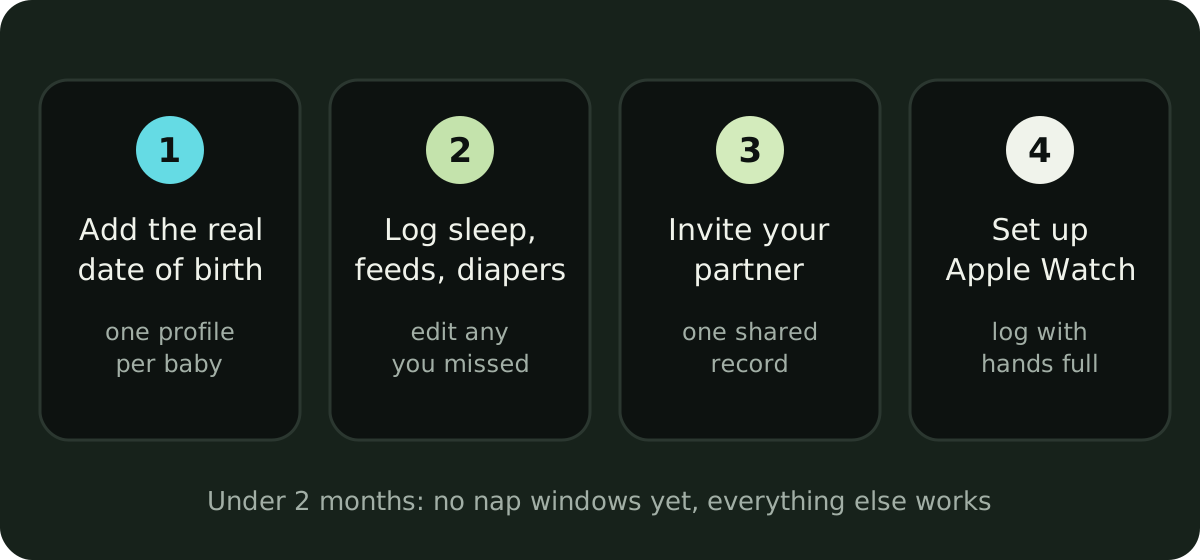
- Add your baby’s profile with their real date of birth. Cradle uses age to decide which guidance is available, so a guessed date would give the wrong answer later. If you have twins or more, give each baby their own profile.
- Decide what you’ll log. Sleep, feeds and diapers cover most of a newborn day. Breastfeeding, bottles and pumping can sit beside sleep, and Cradle also supports solids, medicine, temperature, mood and notes for later.
- Invite your partner or another caregiver. Only the parent who added the baby can send invitations, and only once the baby has a saved profile.
- Set up the Apple Watch companion if you have one. It’s the easiest way to log with your hands full.
What is worth logging in the newborn weeks?
Log what you’d otherwise try to remember at 3am. For most families that means sleep, feeds and diapers:
- Sleep: start the timer when your baby settles and record the wake-up. Log night wakings and the morning wake-up too, so daytime and overnight sleep stay in one record.
- Feeds: nursing, bottles and pumping sessions. Cradle shows the last feed next to how long your baby has been awake or asleep.
- Diapers: one glance shows when the last diaper was changed and what was logged.
You don’t need to log perfectly. If a nap goes unrecorded, add it later or edit the entry; you can revisit previous days. Our posts on how often a newborn should eat and how often newborns wake at night explain what those entries usually look like at this age.
How do I log when both hands are full?
Use the watch or the Lock Screen. The Apple Watch companion lets you start or end sleep, record nursing, add a bottle and log a diaper change, and it shows your baby’s current sleep state, last feed, last diaper and today’s sleep. Open Cradle and sign in on your paired iPhone first, then choose your baby on the watch. Tracking sleep from Apple Watch walks through the setup.
On iPhone, Live Activities let you follow a running nap on the Lock Screen, so a glance at the phone tells you how long your baby has been down.
How do two of us share the newborn nights?
Invite the other person to your baby’s nursery. Open Settings for your baby, tap Invite a caregiver, choose Partner or Caregiver, and send the code or let them scan the QR code. A code works once and expires after 15 minutes. The owner’s active subscription covers invited caregivers, so your partner doesn’t need a separate one. How to invite a caregiver has the full steps.
Then choose your notifications. Cradle lets each person decide whether to get sleep updates when someone else logs sleep. During newborn nights, the parent who is off duty may want those switched off. You can also set one-off or daily care reminders.
How do I use the timeline before nap windows start?
Read it as a record of what happened. The daily timeline shows naps, feeds, diapers and night wakings in the order they happened, and trends let you look at sleep, naps and awake time over days. These records describe your baby’s routine; they don’t say how much your baby should sleep.
A week of entries can show you things that are hard to see from memory: when the longer stretches tend to fall, how far apart feeds are, how many wet and dirty diapers there were today. If something worries you, the log helps you describe it to your pediatrician, but call them about any concern rather than waiting for a pattern.
What happens when my baby turns two months?
Your baby becomes old enough for nap windows, but age alone doesn’t switch them on. Cradle also needs usable completed sleep records from the previous 14 days, an accurate current sleep state, and any sleep-context questions answered. Predictions may stay paused when prematurity or medical and feeding context is unknown or restricted. The sleep you logged in the newborn weeks counts toward that history.
When a window does appear, it’s a possible time to offer a nap, not a guarantee, and any estimated reliability score describes the records behind it, not accuracy. How to get your first nap window covers what to check if none shows yet, and the nap predictions guide explains how it’s calculated.
Sources
This article is for general education and is not medical advice. Talk to your pediatrician about your baby's health.